- CPU scheduling is a key part of multi-programmed operating systems. By switching between processes, the operating system (OS) helps the computer work more efficiently.
- In modern systems, the OS actually schedules kernel-level threads rather than entire processes, but people often use the terms process scheduling and thread scheduling interchangeably. When talking about general scheduling concepts, we might still say "process scheduling."
Key Topics:
- Basic Concepts – Fundamental ideas behind CPU scheduling.
- Scheduling Criteria – Factors used to evaluate scheduling performance.
- Scheduling Algorithms – Different methods the OS uses to schedule tasks.
- More Terms Related to CPU Execution (Read on your own! 5555)
Basic Concepts
- The goal of multiprogramming is to use CPU time efficiently (productively).
- Several processes are stored in memory at the same time.
- If a process has to wait, the operating system (OS):
- Takes away the CPU from that process.
- Gives the CPU to another process in the ready queue.
- The big question: Which process should get the CPU next?
- This is where scheduling comes in.
- We will study 6 scheduling algorithms
Nature of a Process: CPU-I/O Burst Cycle
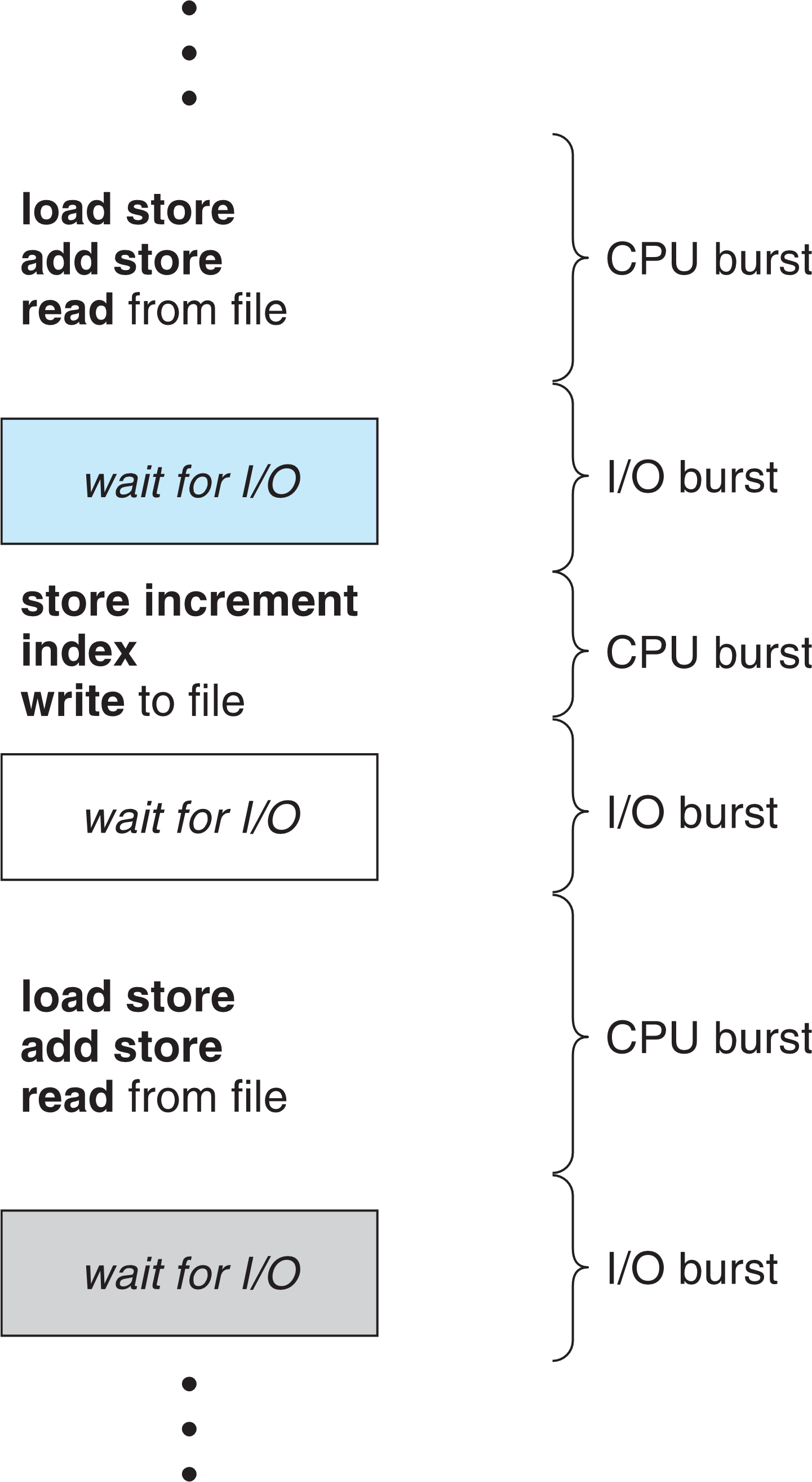
- When a process runs, it doesn’t always use the CPU continuously.
- Instead, it switches between: (จริง ๆ แล้วมันทำงี้)
- CPU bursts (when the CPU is actively processing)
- I/O bursts (when the process is waiting for input/output, like reading from a file or network).
- A process keeps alternating like this:
- CPU burst → I/O burst → CPU burst → I/O burst …
Until it finishes and terminates.
- CPU burst → I/O burst → CPU burst → I/O burst …
Histogram of CPU-Burst Duration
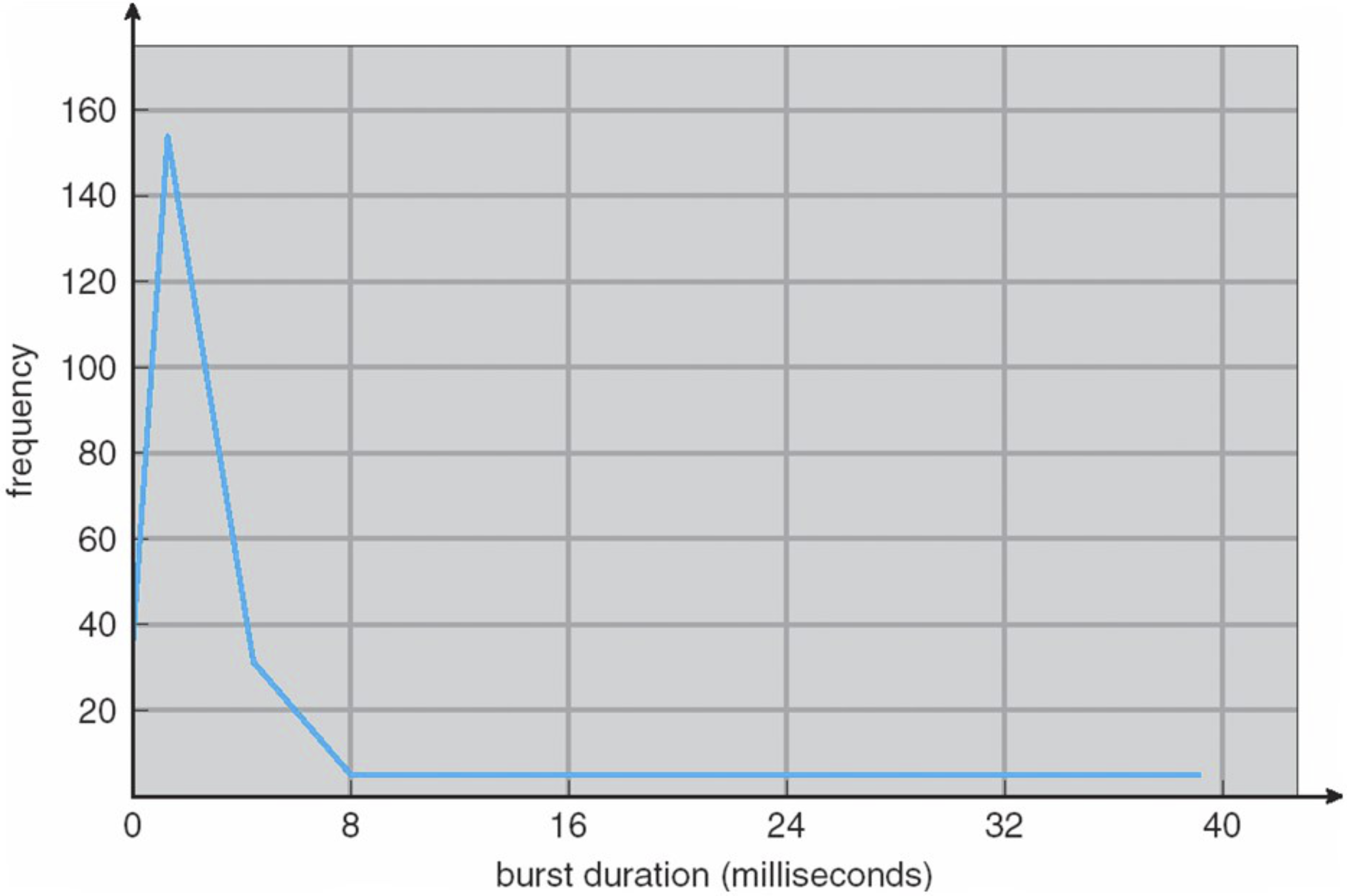
- A histogram is a chart that shows how often something happens.
- In this case, it shows how long CPU bursts last.
- X-axis → CPU burst duration (how long the CPU is used at a time).
- Y-axis → Frequency (how many times bursts of that length happen).
What it means:
- Most CPU bursts are short, meaning processes frequently switch between CPU and I/O.
- Only a few bursts are long, meaning some processes need the CPU for a long time before switching to I/O.
- This suggests that many programs interact with I/O devices often (like reading/writing files or waiting for user input) → ดังนั้นเราจะทำยังไงให้ใช้ CPU คุ้มสุด?
CPU Scheduler
- When the CPU becomes idle, the CPU scheduler (also called the short-term scheduler) picks a process from the ready queue to run next.
- The CPU scheduler might also select a new process when:
- (a) The current process moves from running → waiting (e.g., requesting I/O).
- (b) The current process moves from running → ready (e.g., an interrupt occurs).
- (c) A process moves from waiting → ready (e.g., I/O completes).
- (d) A process terminates.
- The scheduling algorithm (discussed in Section 3) determines which process to run next.
Preemptive and Non-preemptive Scheduling
A scheduling algorithm (Section 3) can be classified into these two types or both.
1. Non-preemptive Scheduling (Cooperative Scheduling)
- Once a process gets the CPU, it keeps it until it finishes or releases it voluntarily.
- ==The CPU cannot be taken away by the system.==
- Examples:
→ (a) Process moves from running → waiting (e.g., waiting for I/O).
→ (d) Process terminates.
2. Preemptive Scheduling
- The CPU can be taken away from a running process.
- The system forces the process to pause and switch to another.
- Examples:
→ (b) Process moves from running → ready (e.g., interrupted by a higher-priority process).
→ (c) Process moves from waiting → ready (e.g., I/O finishes, and it re-enters the queue).
Investigation of Scheduling Algorithms
Assumptions:
- The system has only one CPU core.
- Each process has only one CPU burst.
→ Once a process fully uses the CPU for its burst time, it finishes and terminates. - Time is measured in milliseconds (ms).
Performance Measures:
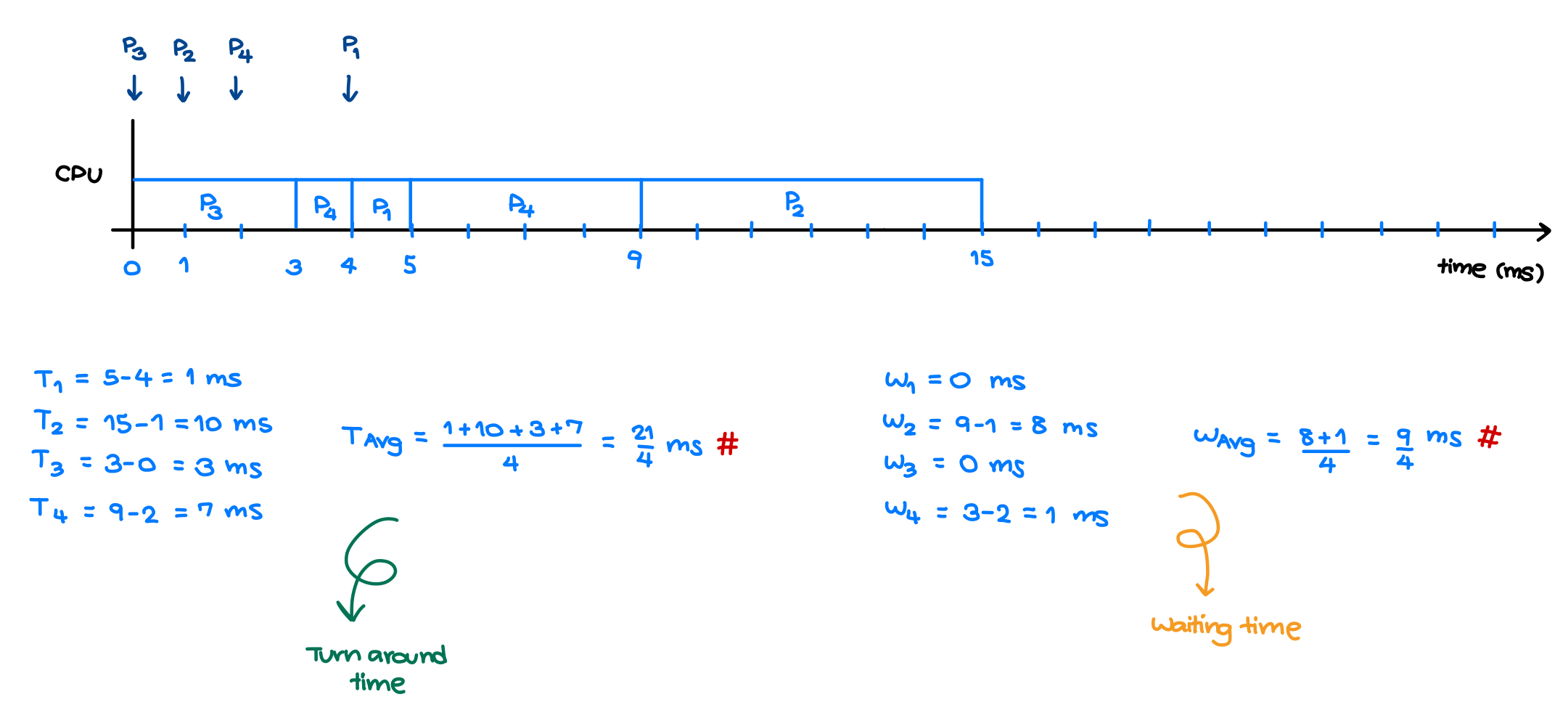
- Waiting Time → Total time a process spends waiting in the ready queue.
- Turnaround Time → Total time from process submission to completion (includes waiting + execution time).
Dispatcher
- The dispatcher is responsible for handing control of the CPU to the process selected by the CPU scheduler.
- Tasks of the Dispatcher:
- Context switching → Saves the state of the current process and loads the state of the next one.
- Switching to user mode → Transitions from kernel mode to user mode for execution.
- Jumping to the user program’s location → Resumes execution of the selected process.
- Dispatch Latency:
- The time taken to stop one process and start another.
- Lower dispatch latency → Faster process switching → Better performance.
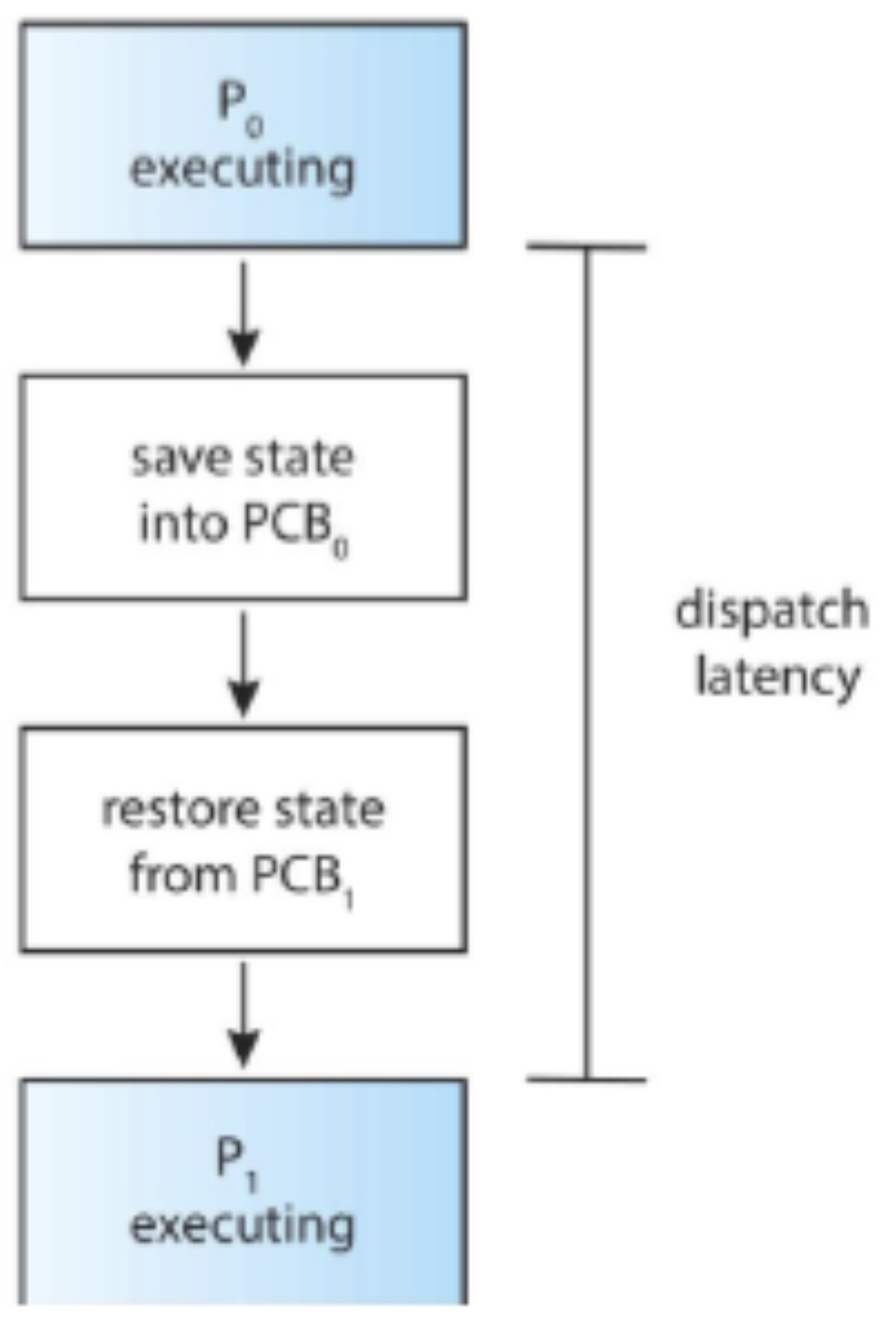
The dispatcher is a software component in the operating system (OS), not hardware.
Scheduling Criteria
These criteria help compare CPU-scheduling algorithms to determine which one is better.
Key Metrics:
- CPU Utilization → Keep the CPU as busy as possible.
- Throughput → Number of processes completed per time unit. (Higher is better)
- Waiting Time → Total time a process spends waiting in the ready queue. (Lower is better)
- Turnaround Time → Total time from process submission to completion. (Lower is better)
→ Includes waiting time + CPU execution time + I/O time. - Response Time → Time from user request submission to the first response (not including output time). (Lower is better)
Example: Waiting Time vs. Turnaround Time
Optimized Scheduling Algorithm
- A good CPU scheduling algorithm should aim for:
- Max CPU utilization
- Max throughput
- Min turnaround time
- Min waiting time
- Min response time
- แต่ของจริงคือทำไม่ได้หมดหรอก อันนี้คือ Ideal มว้ากกกกกก
Scheduling Algorithms
- CPU scheduling deals with the problem of deciding which of the processes (or miniprocesses) in the ready queue is to be assigned to the CPU.
- Note that, in this section:
- The average waiting time is used as the scheduling criterion.
- Only one CPU burst (in milliseconds) per process is considered.
Investigation of Scheduling Algorithms
List of scheduling algorithms
- First-Come, First-Serve (FCFS) → Processes are scheduled in the order they arrive (like a queue).
- Shortest Job First (SJF) → The process with the shortest CPU burst gets the CPU first.
- Priority Scheduling → The process with the highest priority runs first.
- Round-Robin (RR) → Each process gets a fixed time slot (quantum) before switching.
- Multilevel Queue Scheduling → Different types of processes are placed in separate queues.
- Multilevel Feedback Queue Scheduling → Similar to multilevel queue but allows processes to move between queues.
Key Differences:
- FCFS, SJF, Priority, RR → Single Ready Queue
- Multilevel Queue & Multilevel Feedback Queue → Multiple Ready Queues
Assumption
- A computer with one CPU core is considered.
- Each process has only one CPU burst. Whenever a process totally owns the CPU equal to the CPU burst, it finishes and terminates.
- The time unit is millisecond (ms).
Performance measures:
- Waiting time = เวลาที่แต่ละ Process รอตั้งแต่เข้ามา
- Turnaround time. = เข้ามา จนถึง เสร็จ (รวมเวลา Execute)
Tools:
- Basic Queueing Diagram → Shows how processes move through the scheduling system.

- Gantt Chart → A timeline visualization of process execution order.
1. First-Come First-Served Scheduling
- Rule:
- The first-come first-serve (FCFS) scheduling algorithm will give the CPU to the first process in the ready queue.
- The FCFS scheduling algorithm is non-preemptive. Once the CPU has been allocated to a process, that process keeps the CPU until it releases the CPU by terminating or requesting I/O.
- Disadvantage: The average waiting time under the FCFS scheduling algorithm is often quite large.
ก็ไม่มีอะไรเลย FCFS (แล้วแต่ว่าอะไรเข้า Ready Queue ตอนไหน ต้องกำหนดมาให้ ถ้าเข้าเวลาพร้อมกัน ก็ต้องบอกลำดับมา) แล้วก็เป็น Non-preemptive ทั้งหมด!
2. Shortest-Job-First Scheduling
- Rule:
- The shortest-job-first (SJF) scheduling algorithm will give the CPU to the processes in ascending order of their CPU bursts (i.e., the process with the smallest CPU burst will own the CPU first).
- The SJF scheduling algorithm can be either preemptive or non-preemptive. The choice depends on what the SJF will do when a new coming process with a CPU burst less than the remaining CPU burst of the running process.
- A preemptive SJF algorithm will switch the CPU (preempt) to run this new shorter-CPU-burst process.
- ถ้ามี Process ที่เข้ามาใหม่ แล้วใช้เวลาน้อยกว่าที่เหลือของ Task ที่ทำงานอยู่ ก็สามารถแย่ง CPU ได้เลย
- A non-preemptive SJF algorithm will allow this running process to finish its CPU burst.
- A preemptive SJF algorithm will switch the CPU (preempt) to run this new shorter-CPU-burst process.
- Among the scheduling algorithms, the SJF scheduling provides the minimum average waiting time.
3. Priority Scheduling
- Rule:
- The priority scheduling algorithm will give the CPU to the process with the highest priority.
- The SJF scheduling algorithm is one of priority scheduling algorithms.
- The FCFS scheduling algorithm is one of equal-priority scheduling algorithms.
- The priority scheduling algorithm can be either preemptive or non-preemptive. The choice depends on what the priority scheduling will do when a new coming process with the priority higher than the priority of the running process.
- A preemptive priority algorithm will switch the CPU (preempt) to run this process.
- A non-preemptive priority algorithm will allow this running process to own the CPU and finish its CPU burst.
Starvation Problem
- A major problem with priority scheduling algorithms is indefinite blocking or starvation.
- This scenario happens when a process with a low priority keeps waiting in the ready queue forever because processes with higher priorities keep coming in.
- A solution of this starvation is aging (i.e., gradually increase the priority of processes that wait in the ready queue for a long time)— ฉลาดมากกก
4. Round-Robin Scheduling
- อันนี้เคยเจอแล้วใน 08 Queue and its applications
- The Round-Robin (RR) scheduling algorithm is designed for timesharing systems. It works like FCFS but with preemption to switch between processes.
- Each process gets a time quantum (10–100 ms). After this, it’s either:
- Shorter burst than quantum → Finishes & releases CPU.
- Longer burst than quantum → Interrupted, moved to the queue’s end, and a context switch occurs.
- Time quantum impact:
- Too large → Becomes FCFS (e.g., 10s quantum). Make sense มากกกก
- Too small → Too many context switches, wasting CPU time. (nothing is productive)
5. Multilevel Queue Scheduling
- Multilevel Queue Scheduling partitions the ready queue into multiple separate queues (We have many ready queue— 1-4 ก่อนหน้านี้มีแค่ Queue เดียวนะ)
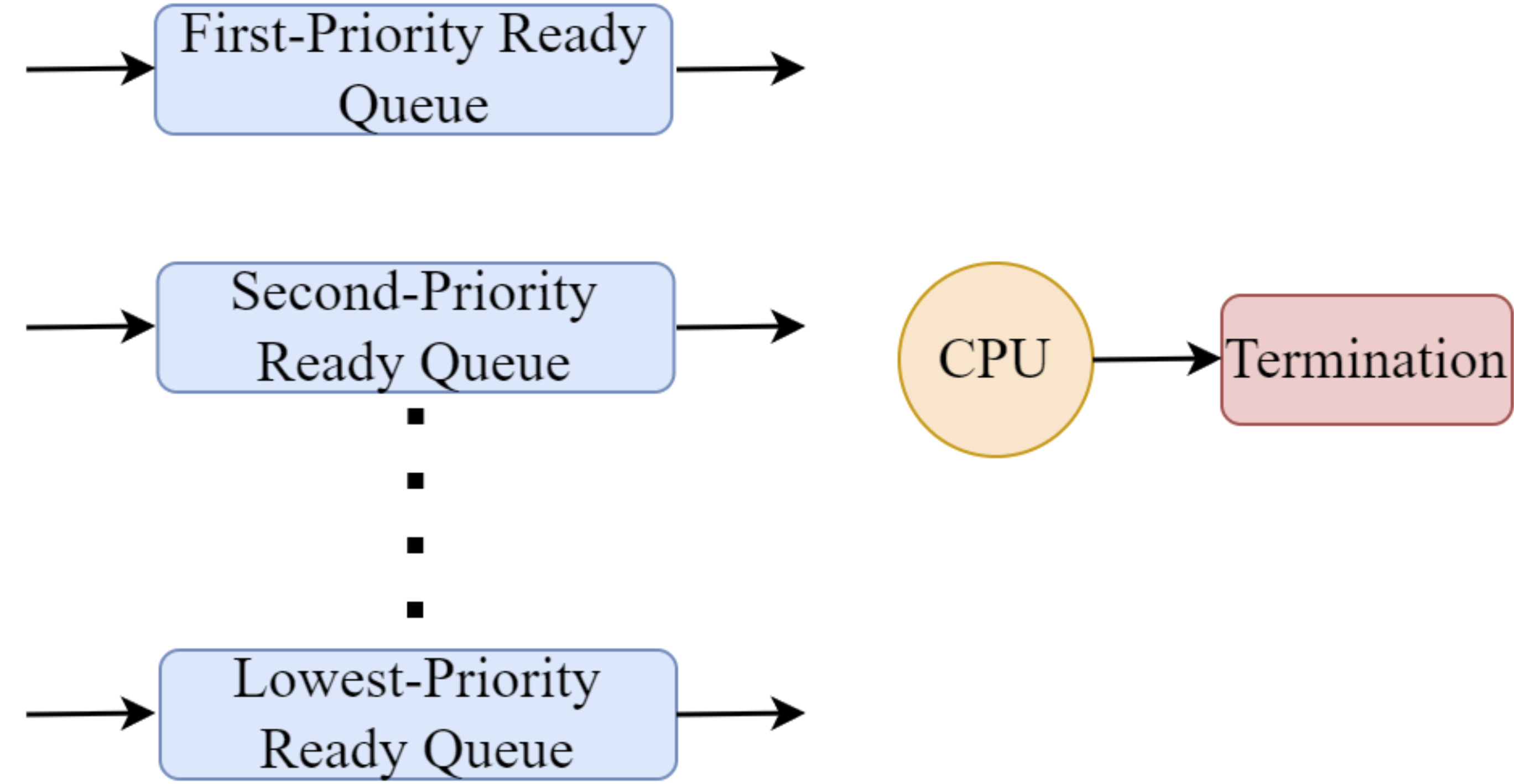
- Rules:
- Each process is permanently assigned to a queue based on properties like memory size, priority, or type.
- Each queue has its own scheduling algorithm and a priority level.
- CPU Execution Order:
- The CPU runs processes from higher-priority queues first.
- A process in a lower-priority queue runs only if all higher-priority queues are empty.
- If a new process enters a higher-priority queue, it preempts the current process.
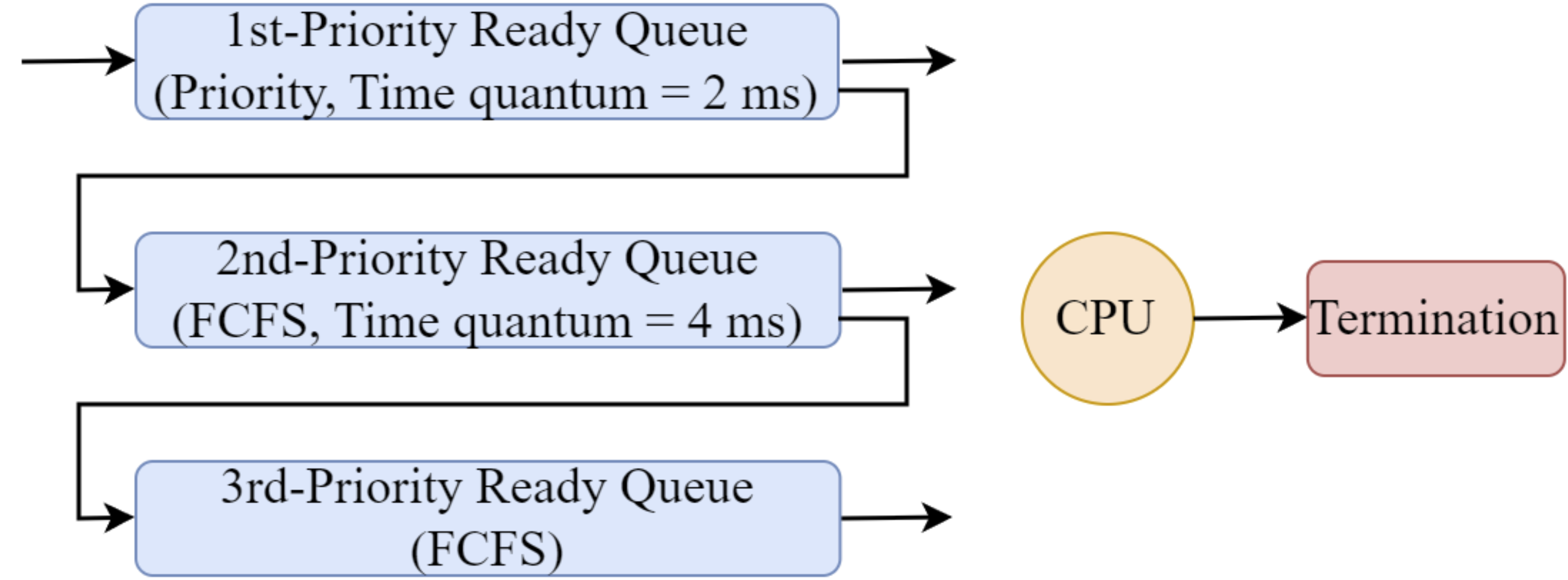
6. Multilevel Feedback Queue Scheduling
- Multilevel Feedback Queue Scheduling improves Multilevel Queue Scheduling by allowing processes to move between queues.
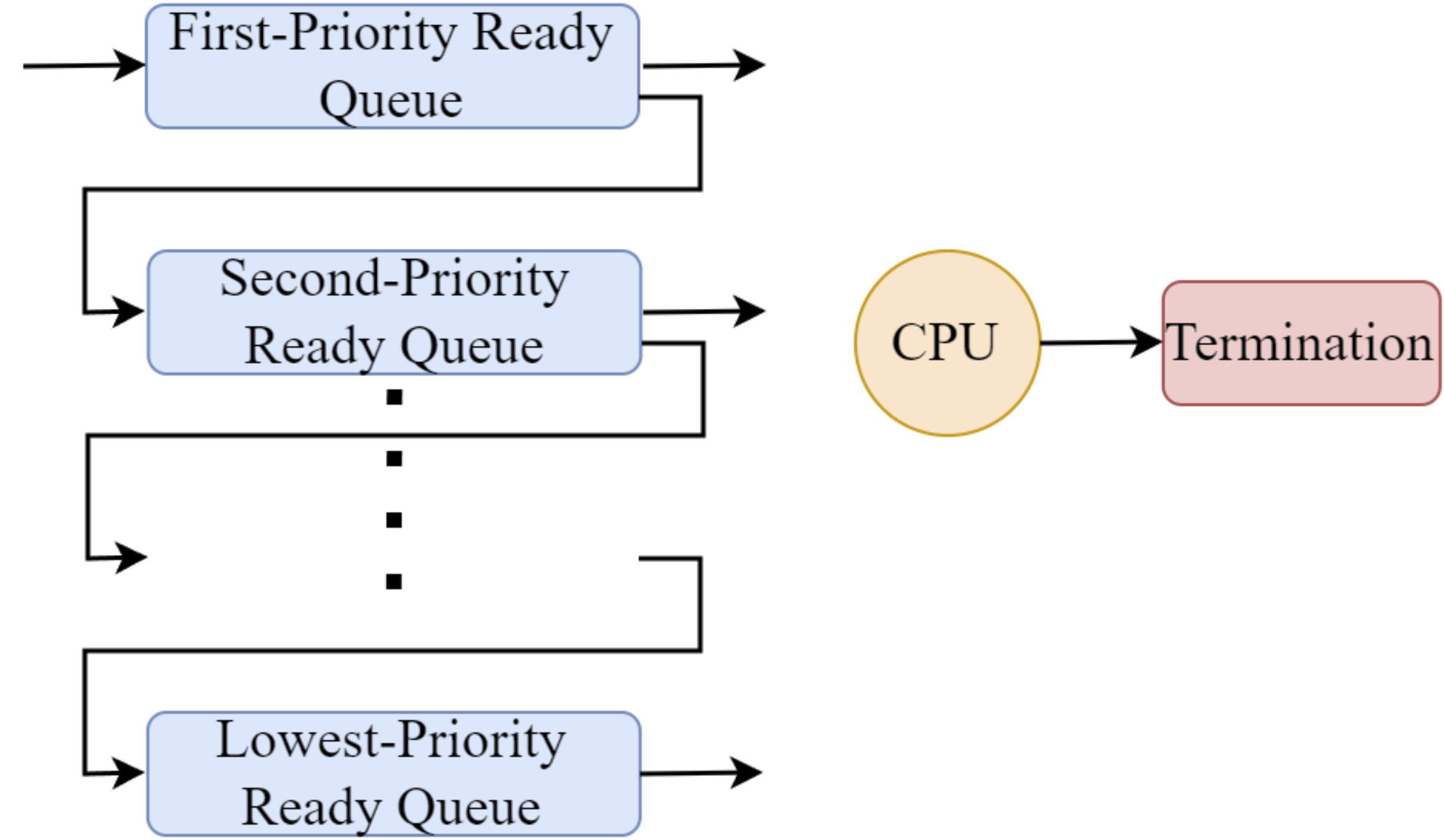
- Rules:
- All processes start in the highest-priority queue.
- If a process isn’t finished, it moves to the next lower queue.
- The CPU runs processes only if all higher-priority queues are empty.
- A new process in a higher-priority queue preempts the current process.
- Key points:
- Higher-priority queues limit CPU time per process.
- Lowest-priority queue has no time limit.
- Each queue can use different scheduling algorithms.
More Key Terms Related to CPU Execution
Asymmetric and Symmetric Processing
When a computer has multiple CPUs, it needs a way to decide which CPU runs which process. There are two main approaches:
-
Asymmetric Multiprocessing → Think of it like Apple's M-series chips with different cores for different tasks.
- One CPU acts as the master → It runs all the OS (kernel) processes.
- Other CPUs only run user programs → Like efficiency cores handling background tasks.
-
Symmetric Multiprocessing (SMP) → More like Apple's multi-core performance mode.
- All CPUs are equal → Any CPU can run both user and OS processes.
- No single "boss" CPU → Work is shared across all processors.
Processor Affinity
- A process/thread tends to stick to the same CPU throughout its execution.
- This is called processor affinity, like how macOS optimizes tasks for specific cores to improve efficiency.
Load Balancing
- Goal: Keep CPU workload evenly distributed in an SMP system.
- Needed when each CPU has its own queue of tasks.
- Two ways to balance load:
- Push Migration → A controller checks if some CPUs are too busy and moves tasks to less busy ones.
- Pull Migration → An idle CPU pulls a task from an overloaded CPU.
(Think of it like macOS dynamically shifting tasks between performance and efficiency cores for smooth operation.)