History: How We Got Here
The Early Days of Databases
- Relational Databases were the mainstay of business applications
- แล้วทำไม Relational Database ยังคงเป็น Mainstay อยู่ → ก็เพราะว่ามี ACID Properties
- Web-based applications caused sudden traffic spikes
- Especially true for public-facing e-Commerce sites
- Developers began to front RDBMS with memcache or integrate other caching mechanisms (e.g., Ehcache)
Think of RDBMS as a single, well-organized filing cabinet. It works great for a small office, but when the entire city needs to file documents simultaneously, it becomes a bottleneck.
Scaling Up RDBMS
The Core Problem
- Issues with scaling when the dataset becomes too big
- RDBMS were not designed to be distributed
- Solution: Look at multi-node database solutions
- Known as "scaling out" or horizontal scaling
- Two main approaches:
- Master-Slave
- Sharding
Scaling RDBMS: Master/Slave
- All writes go to the master
- All reads performed against replicated slave databases
- Problem: Critical reads may be incorrect — writes may not have been propagated down yet
- Problem: Large datasets pose issues, as the master must duplicate data to all slaves
Like a newspaper: the editor (master) writes the stories, and printing machines (slaves) copy them. But if the presses haven't caught up yet, readers get yesterday's news.
Scaling RDBMS: Sharding
- Also called Partitioning
- Scales well for both reads and writes
- Not transparent — the application needs to be partition-aware
- Cannot have relationships/JOINs across partitions
- Loss of referential integrity across shards
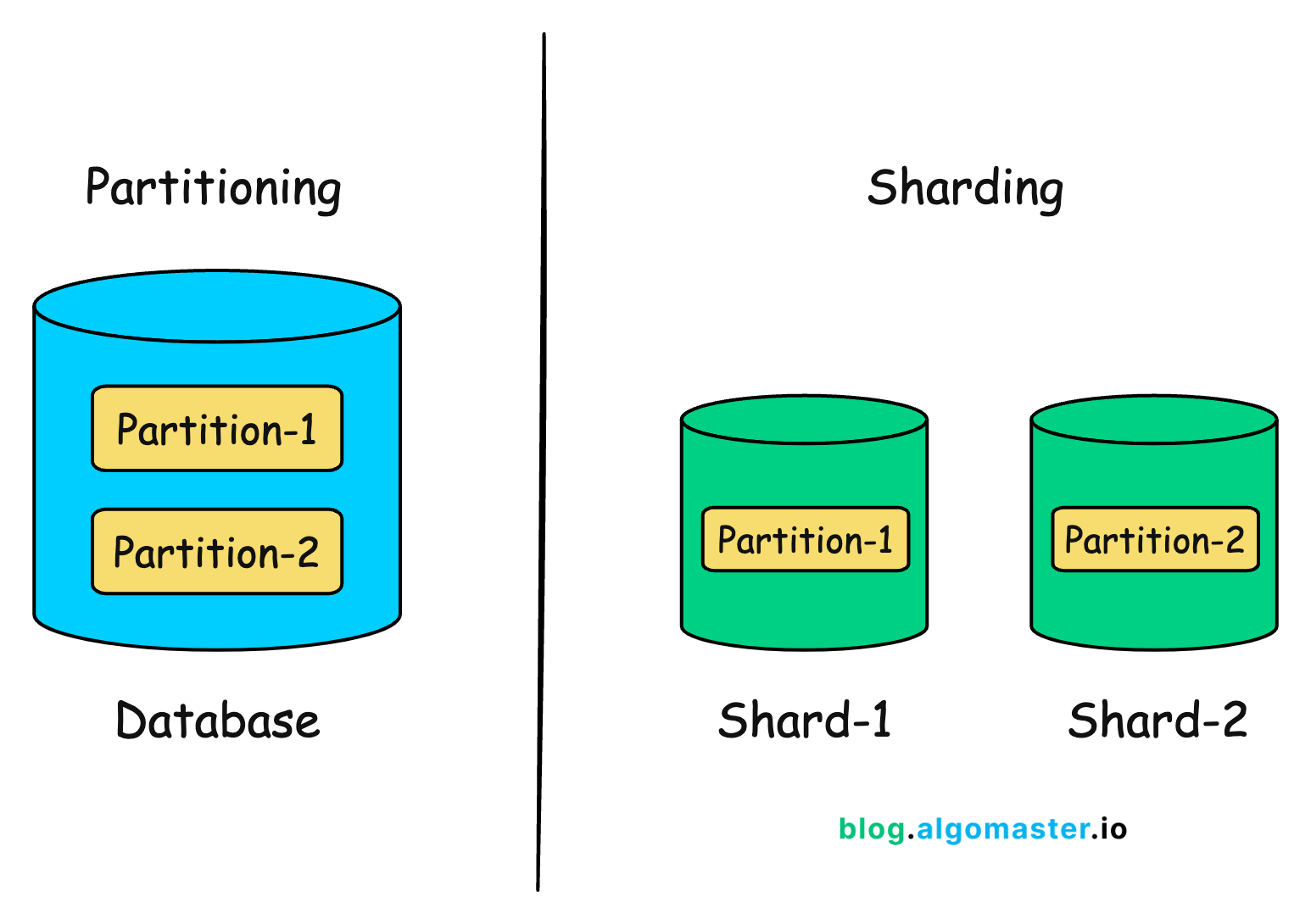
What Is Sharding?
- A type of database partitioning that separates very large databases into smaller, faster, more manageable parts called data shards
- The word shard means a small part of a whole
- A mechanism of horizontal scaling
- Distributes datasets (tables/data) over multiple servers/databases
- Each shard is independent
- All shards together constitute one logical database
Like splitting a big dictionary into volumes A-M and N-Z — each volume is independent, but together they cover the whole alphabet.
Sharding Techniques
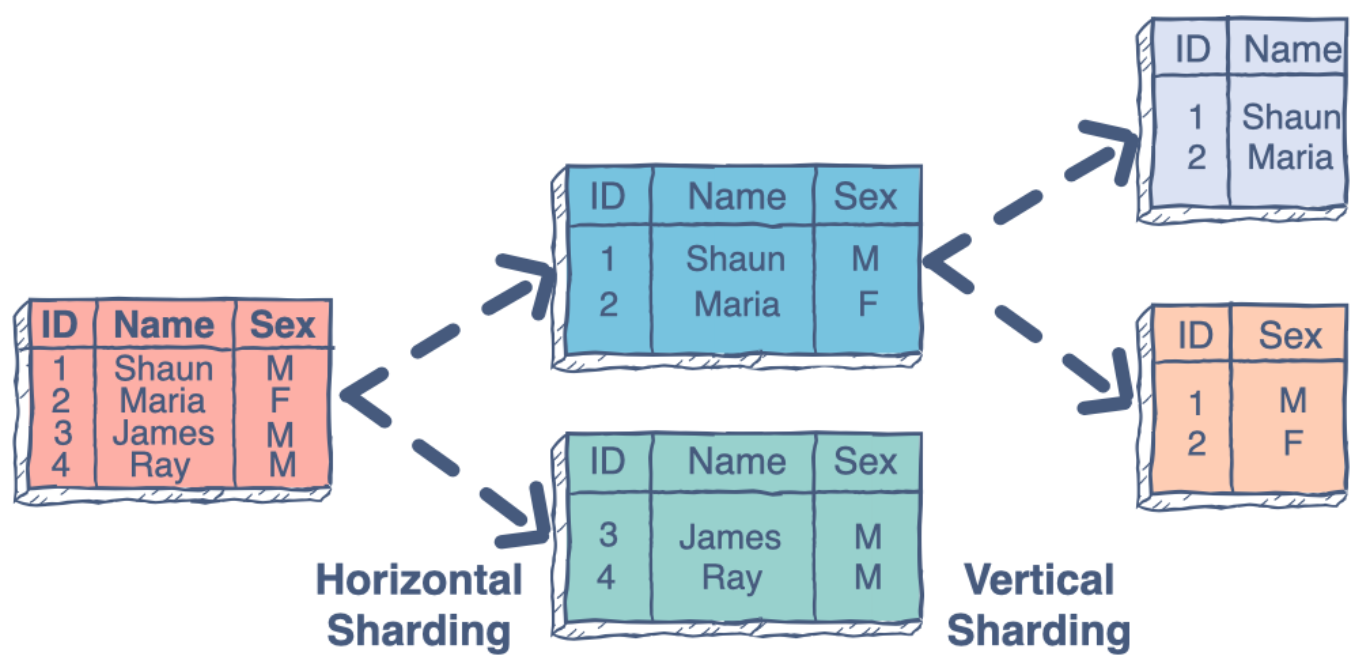
- Vertical Partitioning — Tables related to a specific feature sit on their own server. May have to rebalance/reshard if tables outgrow the server.
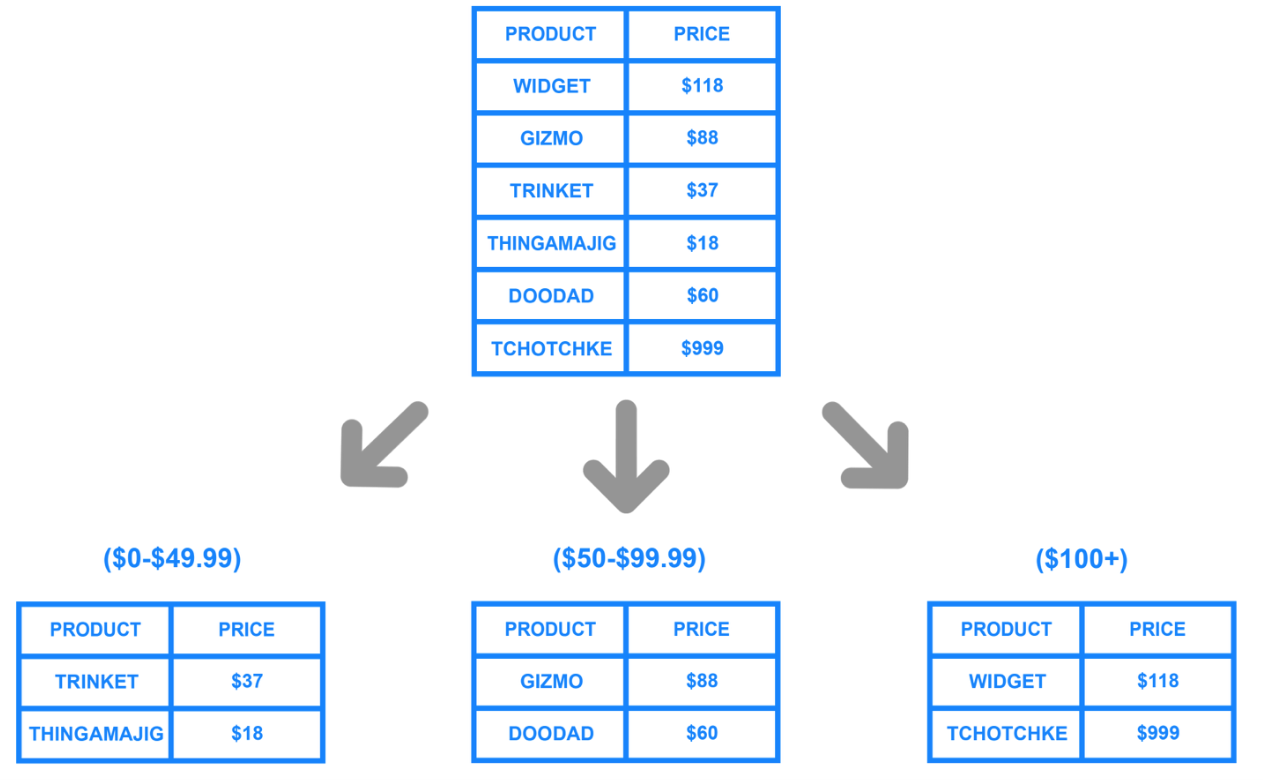
- Range-Based Partitioning — When a single table cannot fit on one server, split it based on a critical value range (e.g., price ranges: 49.99, 99.99, $100+).
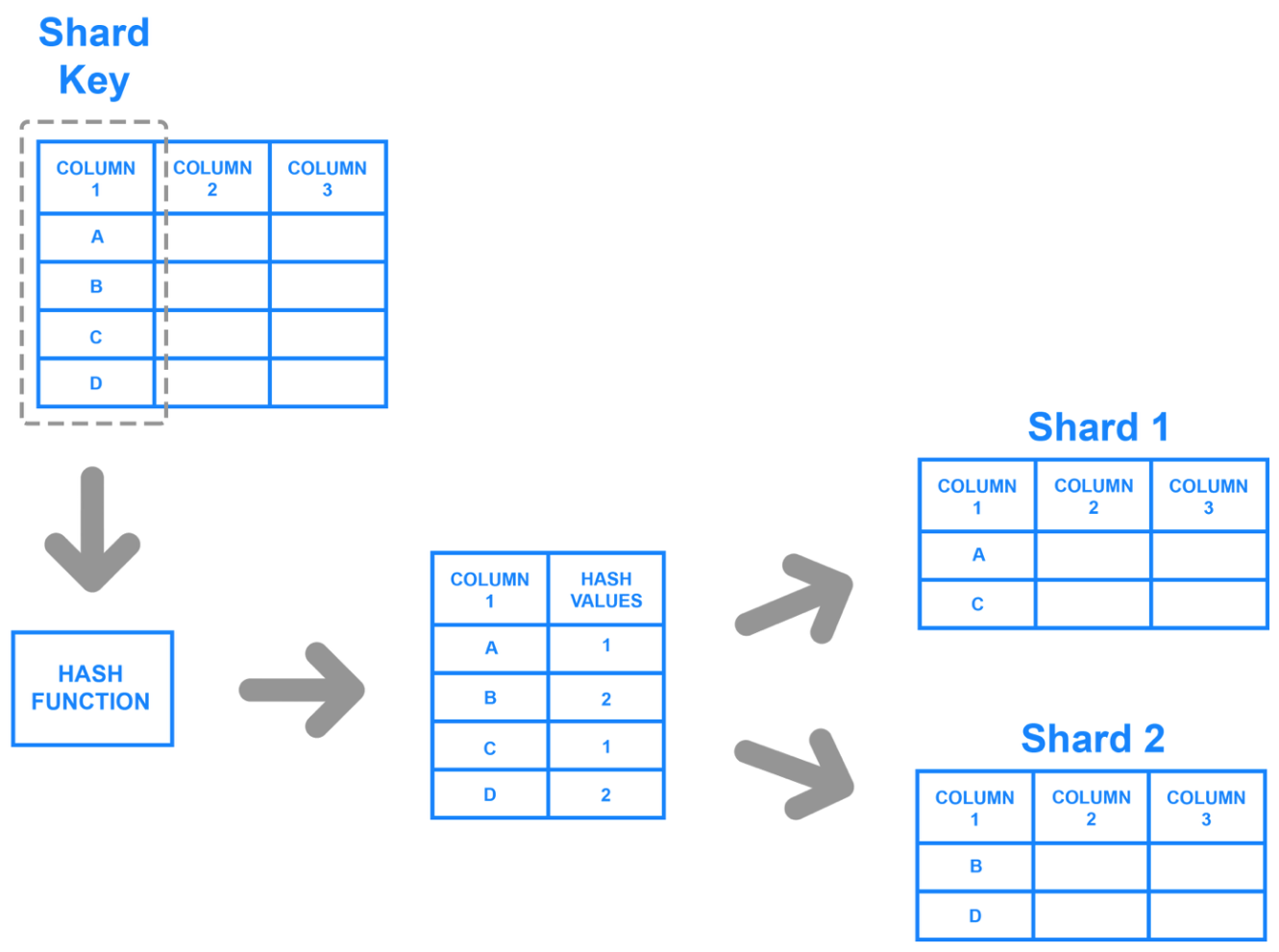
- Key/Hash-Based Partitioning — Use a key value in a hash function and use the result to determine which server to route to.
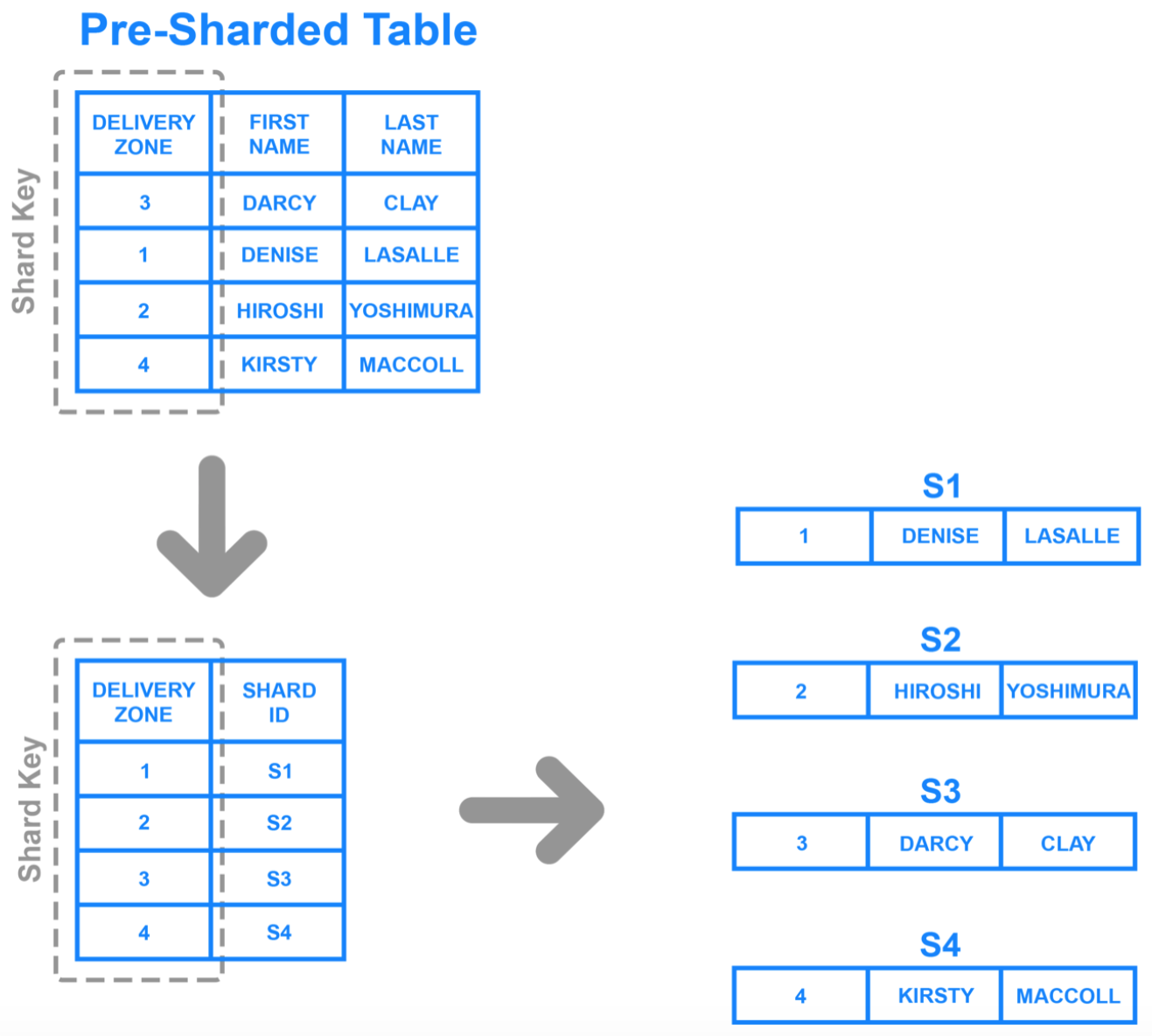
- Directory-Based Partitioning — Have a lookup service with knowledge of the partitioning scheme. Allows adding servers or changing the partition scheme without changing the application.
Other Ways to Scale RDBMS
- Multi-Master Replication
- INSERT only (no UPDATES/DELETES)
- Otherwise compromise consistency
- No JOINs → reduces query time
- Involves de-normalizing data
- INSERT only (no UPDATES/DELETES)
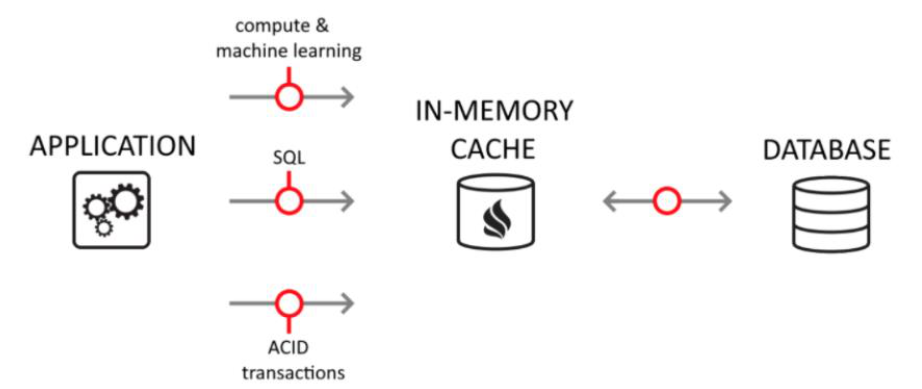
- In-Memory Databases
- Designed to enable minimal response times
- Eliminates the need to access disk
What Is NoSQL?
- Stands for "Not Only SQL"
- A class of non-relational data storage systems
- Usually do not require a fixed table schema nor use the concept of joins
- All NoSQL offerings relax one or more ACID properties (see: CAP Theorem)
NoSQL is like a flexible notebook instead of a rigid spreadsheet — you can add any kind of information without pre-defining the format.
Why NoSQL?
- RDBMS cannot be the "be-all/end-all" for data storage
- Just as there are different programming languages for different jobs, we need other data storage tools in the toolbox
- A NoSQL solution is increasingly acceptable in production environments
- Comparison: like accepting Ruby/Rails or Groovy/Grails over traditional Java/J2EE
Ruby is a scripting language based on C (uses a Ruby interpreter). Groovy is based on Java (uses JVM). Rails is a web framework for Ruby. Grails is a web framework for Groovy.
How Did We Get Here?
- Explosion of social media (Facebook, Twitter) with massive data needs
- Rise of cloud-based solutions such as Amazon S3 (Simple Storage Solution)
- Shift to dynamically-typed data with frequent schema changes (analogous to moving from static to dynamic typing in programming)
- Growth of the open-source community
Dynamo and BigTable — The Seeds of NoSQL
- Three major papers seeded the NoSQL movement:
- BigTable — Google
- Dynamo — Amazon
- Gossip Protocol — for discovery and error detection
Dynamo Key Ideas
- Distributed key-value data store
- Eventual consistency (Store first → consistency checking later)
- Introduced the CAP Theorem (discussed below)
Amazon Dynamo Architecture
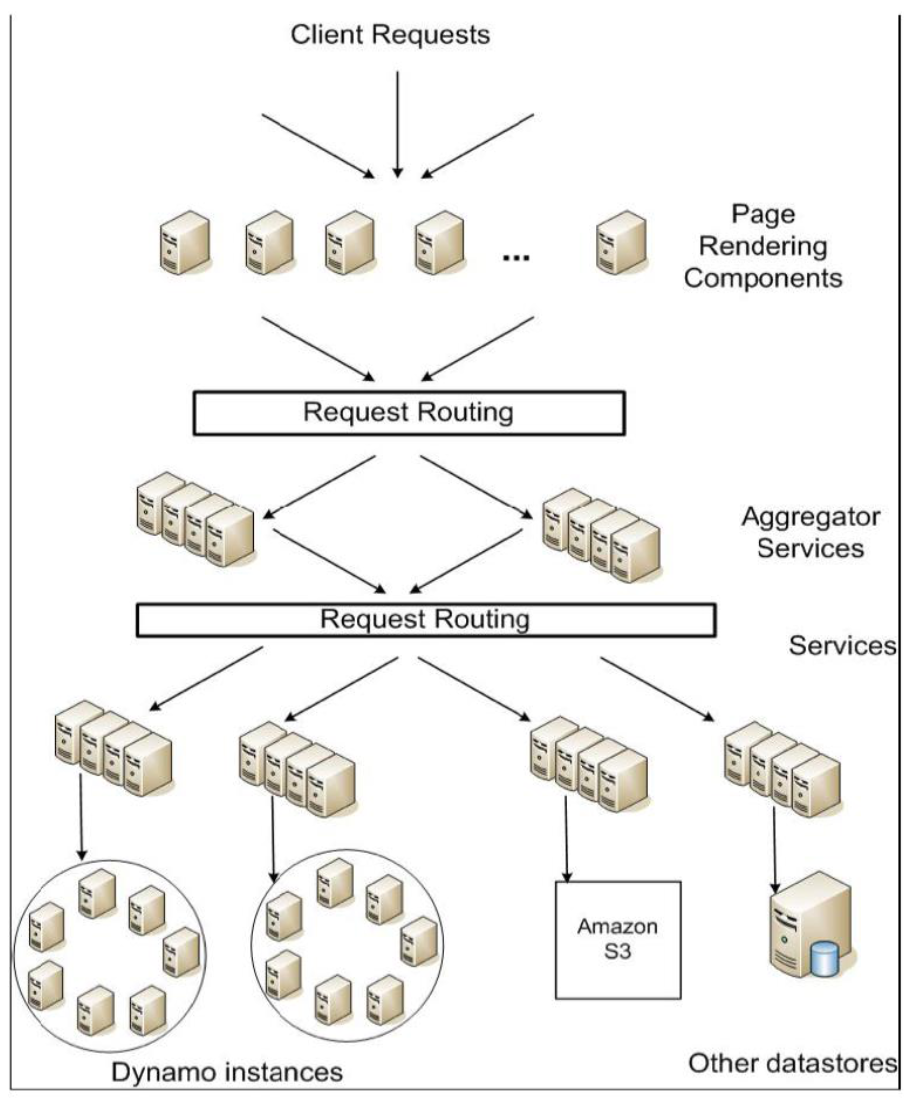
Amazon Dynamo
- Platform for Amazon's e-commerce services: shopping cart, best seller list, product catalog, promotional items, etc.
- A highly available, distributed key-value storage system
- Exposes only
put()andget()interfaces - Aims to provide "always on" guarantee at the cost of some consistency
Design Consideration (Dynamo)
- Incremental scalability — scale out one node at a time
- Minimal management overhead
- Symmetry — no master/slave nodes (decentralized control)
- Decentralized control — centralized approach leads to outages
- Heterogeneity — exploit the capabilities of different nodes
NoSQL Movement: What Is It All About?
- NoSQL is a term for a movement in database design away from traditional relational models
- With the emergence of big data and cloud computing, traditional databases and schema-driven design are too constraining
Reasons for NoSQL Databases
- Schema-less data storage
- Quick data storage and traversal
- Easier to program
- Better performance
- Easily distributed
Three Popular NoSQL Designs
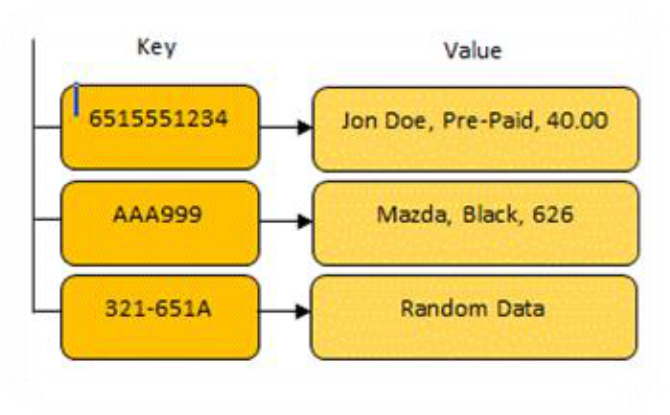
- Key/Value Store
- Document Database
- Graph Database
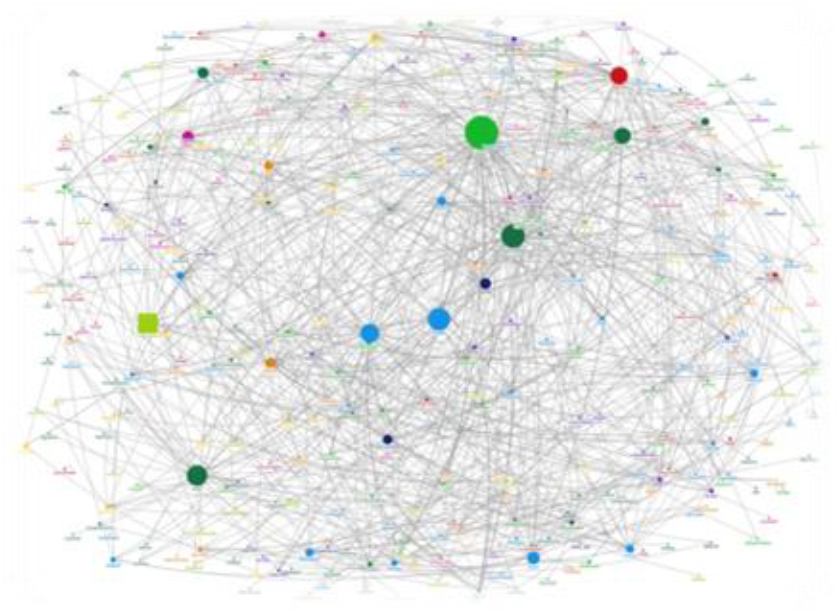
Key/Value Store
- Values are associated with and looked up by a key
- Keys can be associated with more than one value
- Data stored in the native data type of the programming language
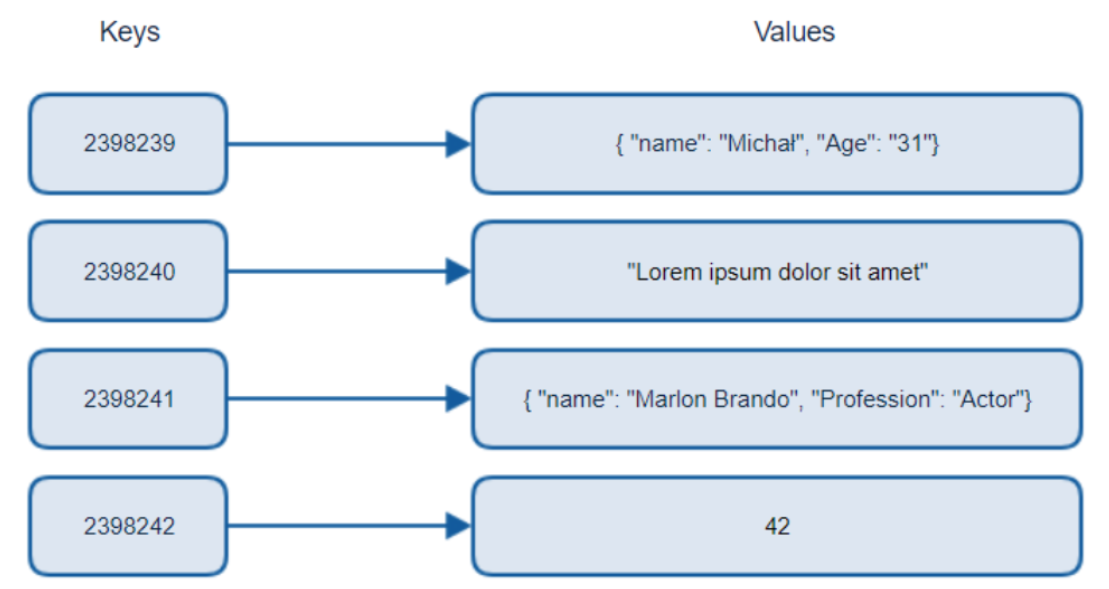
Like a dictionary or hashmap — you look up a word (key) and get its definition (value).
Document Database
- Stores information in documents such as JSON or XML
- Document format implies the relationship between data points
- Most documents create hierarchies of data within themselves
Rows vs. Documents
- Relational DBs store data as rows in a table
- Document DBs store data as JSON documents
Columns vs. Properties
- Relational rows have columns (fixed)
- Documents have properties (flexible — any document can have different properties)
Example: Relational vs. Document
| ID | Name | isActive | DOB |
|---|---|---|---|
| 1 | John Smith | True | 8/30/1964 |
| 2 | Sarah Jones | False | 2/18/2002 |
| 3 | Adam Stark | True | 7/13/1987 |
| Document 1: |
{
  "id": "1",
  "name": "John Smith",
  "isActive": true,
  "dob": "1964-30-08"
}
Document 2:
{
  "id": "2",
  "fullName": "Sarah Jones",
  "isActive": false,
  "dob": "2002-02-18"
}
Document 3:
{
  "id": "3",
  "fullName": { "first": "Adam", "last": "Stark" },
  "isActive": true,
  "dob": "2015-04-19"
}
Notice that Document 2 uses
fullNameinstead ofname, and Document 3 nests the name — this flexibility is impossible in relational tables.
Graph Database
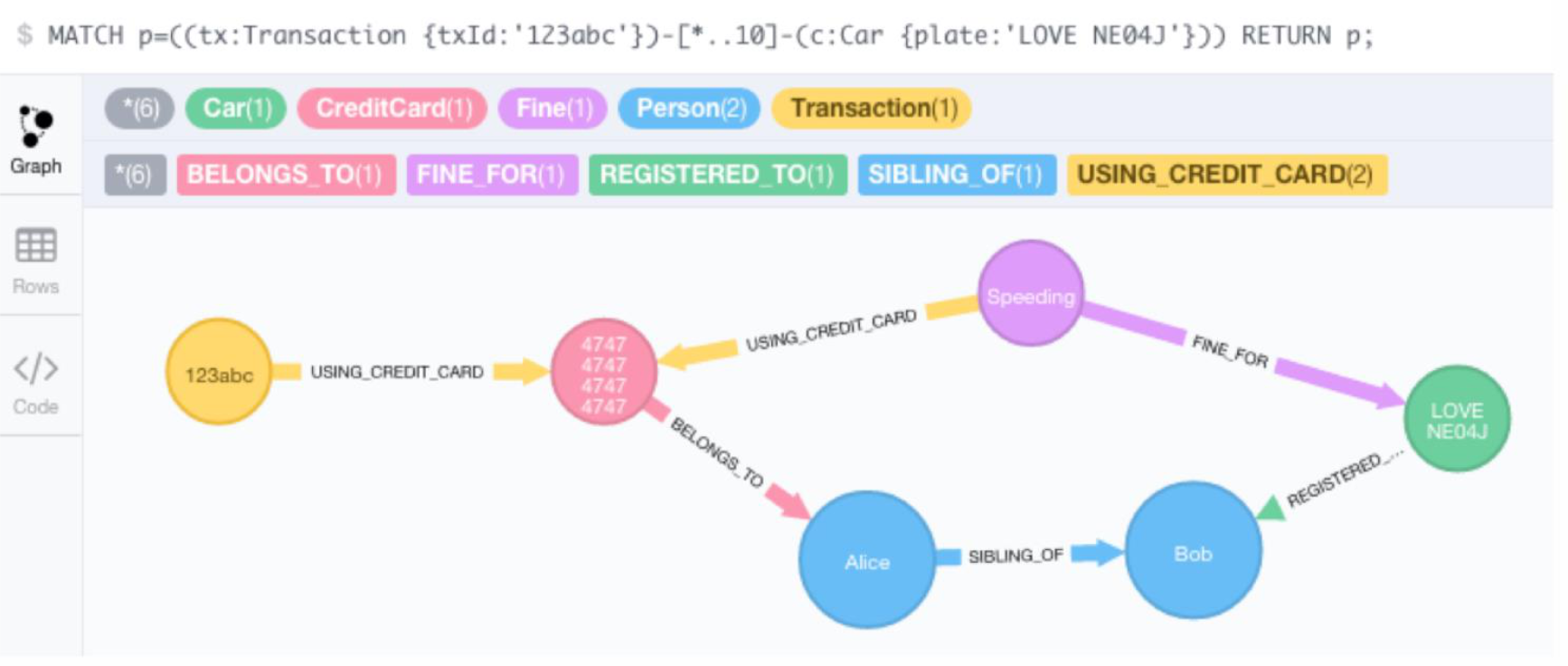
- Stores all information in nodes (vertices) and edges
- Graph traversal is how you "query" the database
- Relationship information is stored in the edges
Why Graph DBs Are Powerful for Investigations
- Easy to query and navigate using the Cypher query language and visualization tools, even for non-developers
- Very fast at analyzing connected data — useful in critical situations (e.g., ongoing terrorist attacks)
- Help users discover the "unknowns"
Example Cypher query:
MATCH p=((tx:Transaction {txId:'123abc'})-[*..10]-(c:Car {plate: "LOVE NE04"})) RETURN p;Like a social network map — instead of asking "who knows John?", you draw lines between people and follow the connections directly.
Two advantages
- Relationship between nodes
- Query Performance
อย่าลืมเพิ่ม Uncovering and investigating illegal …
OrientDB
- A combined graph database and document database
- Uses JSON documents to store information in nodes and edges of the graph
- Uses an HTTP REST API to access/edit the database
- Runs on the Java Virtual Machine (JVM) — works on almost any machine
- Has APIs written in C/C++, Ruby, PHP, and Java
- Because of HTTP, easily distributed across multiple machines
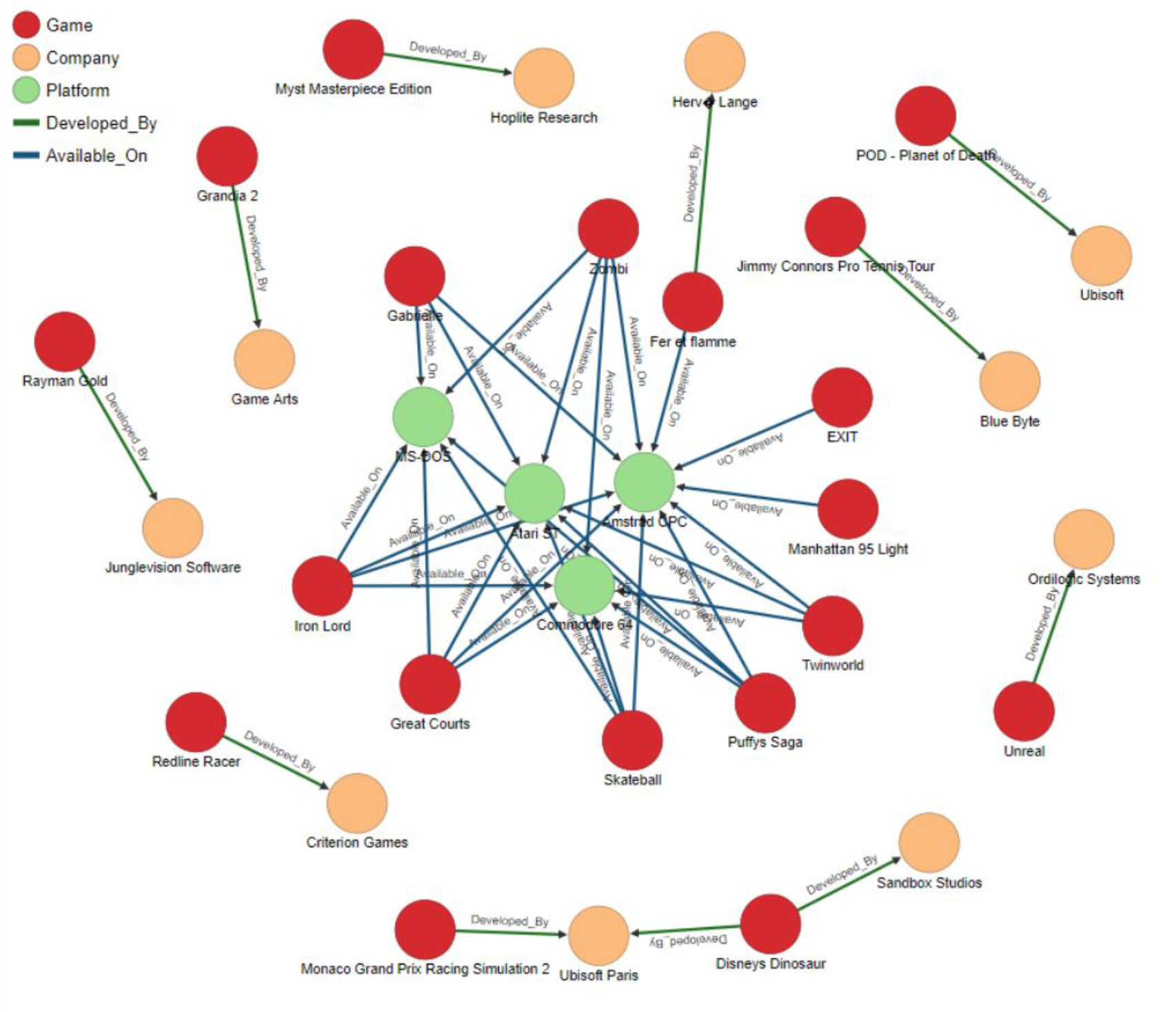
Neo4j (GraphBase)
- A graph is a collection of nodes (things) and edges (relationships) that connect pairs of nodes
- Attach properties (key-value pairs) on both nodes and relationships
- Relationships connect two nodes — both nodes and relationships can hold an arbitrary number of key-value pairs
- A graph database can be thought of as a key-value store with full relationship support
- Website: http://neo4j.org/
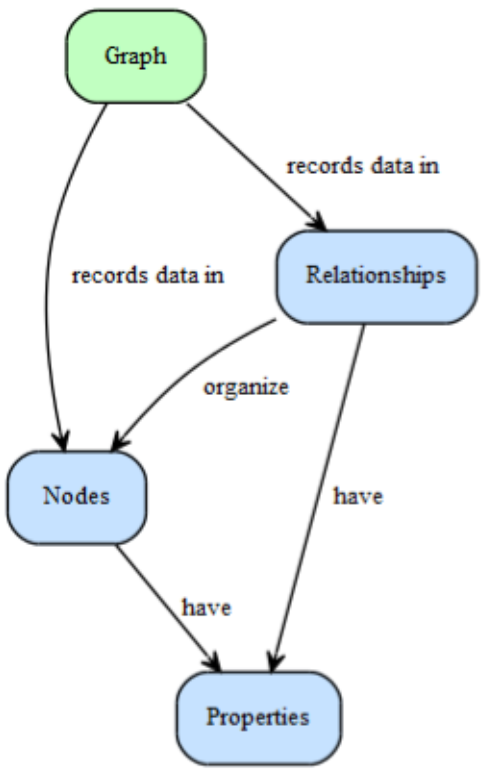
2.1.1 — A Graph Contains Nodes and Relationships
"A Graph — records data in — Nodes — which have — Properties"
- The simplest graph is a single Node with named values (Properties)
- A node could start with one property and grow to millions
- At some point, distribute data into multiple nodes organized with explicit Relationships
2.1.2 — Relationships Organize the Graph
"Nodes — are organized by Relationships — which also have — Properties"
- Relationships organize nodes into arbitrary structures: lists, trees, maps, compound entities, or complex networks
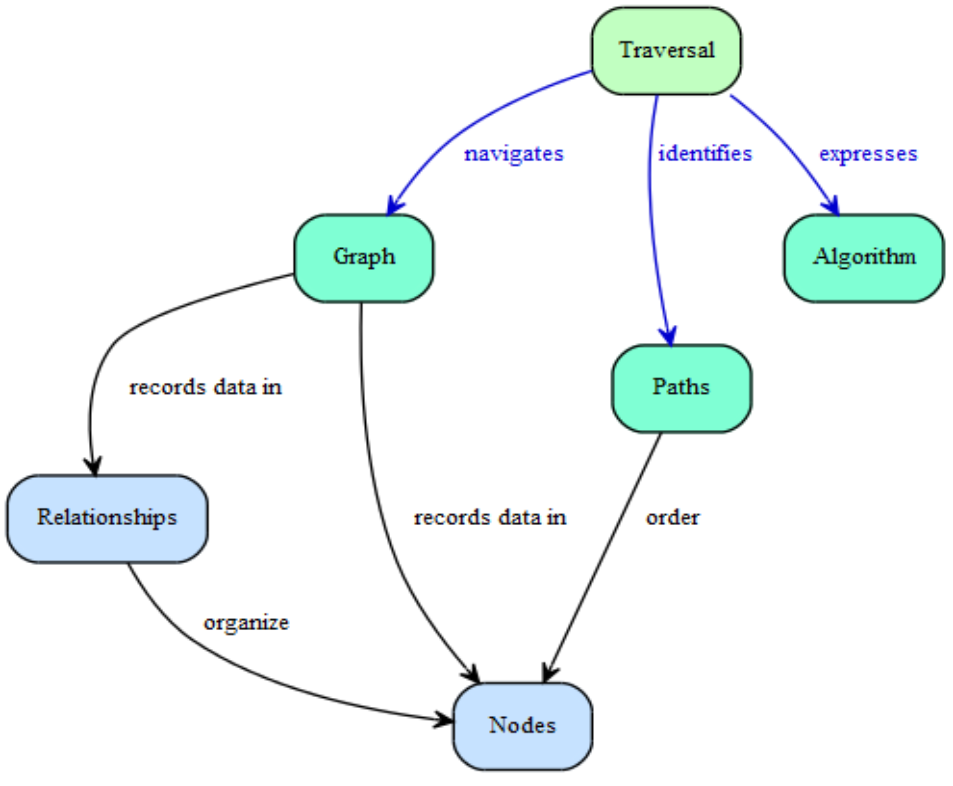
2.1.3 — Query a Graph with a Traversal
"A Traversal — navigates — a Graph; it — identifies — Paths — which order — Nodes"
- A traversal queries a graph by navigating from starting nodes to related nodes according to an algorithm
- Example questions: "What music do my friends like that I don't own yet?" or "If this power supply goes down, what web services are affected?"
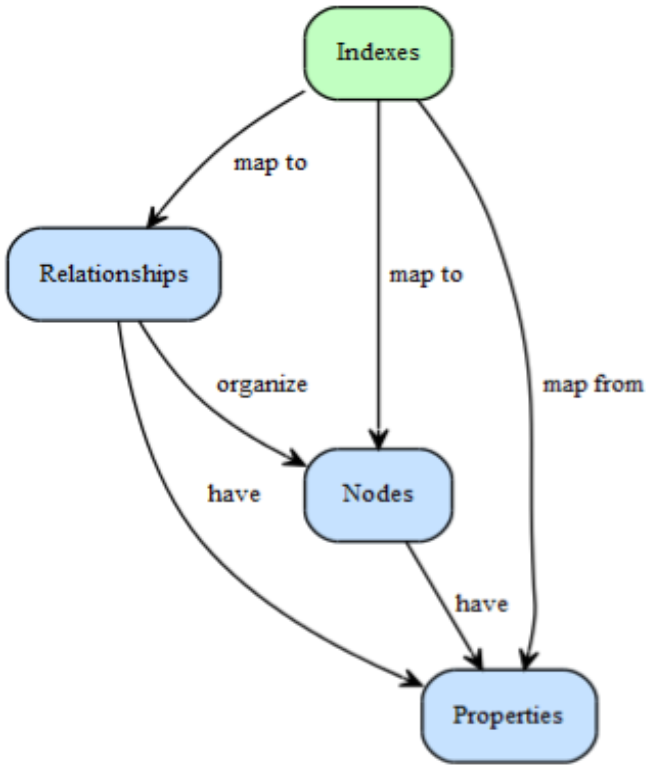
2.1.4 — Indexes Look Up Nodes or Relationships
"An Index — maps from — Properties — to either — Nodes or Relationships"
- Use an index to find specific nodes/relationships by property, rather than traversing the entire graph
- Example: "Find the account for username 'master-of-graphs'"
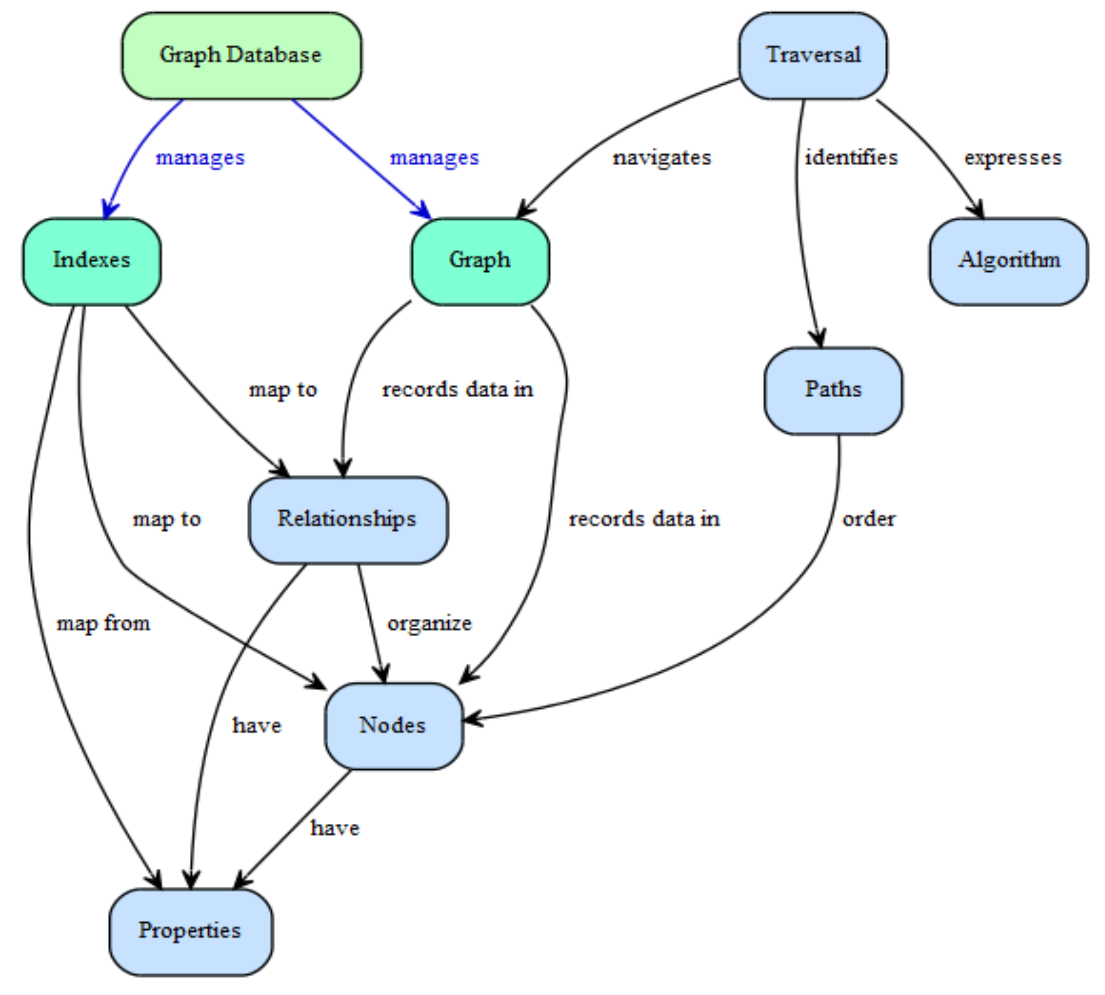
2.1.5 — Neo4j Is a Graph Database
"A Graph Database — manages a — Graph and — also manages related — Indexes"
- Commercially supported, open-source graph database
- Designed and built to be a reliable database optimized for graph structures
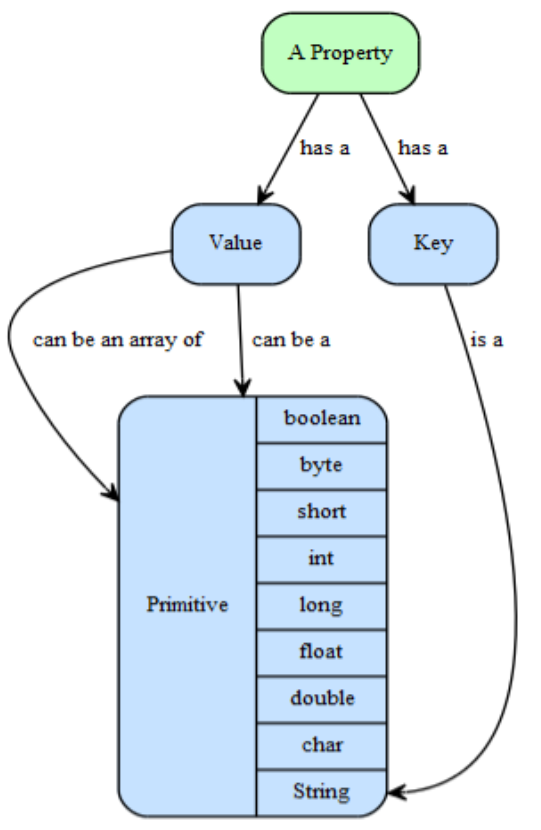
Neo4j Properties
- Properties are key-value pairs where the key is a string
- Values can be a primitive or an array of one primitive type (e.g., String, int, int[])
nullis NOT a valid property value — model nulls by the absence of a key
Neo4j Features
- Dual license: open source and commercial
- Well-suited for: tagging, metadata annotations, social networks, wikis, and other network-shaped or hierarchical data
- Intuitive graph-oriented model: flexible networks of nodes, relationships, and properties instead of rigid tables
- Performance: ~1000x improvement over relational DBs for graph queries
- Disk-based, native storage manager optimized for graph structures
- Massive scalability: handles billions of nodes/relationships/properties on a single machine; can shard across multiple
- Fully transactional (like a real database)
- Traverses depths of 1000 levels and beyond at millisecond speed
Distributed Databases
- As databases grow larger, it becomes necessary to expand hardware “SCALE UP”
- Distributed databases use multiple cheaper computers working together rather than one large machine “SCALE OUT”
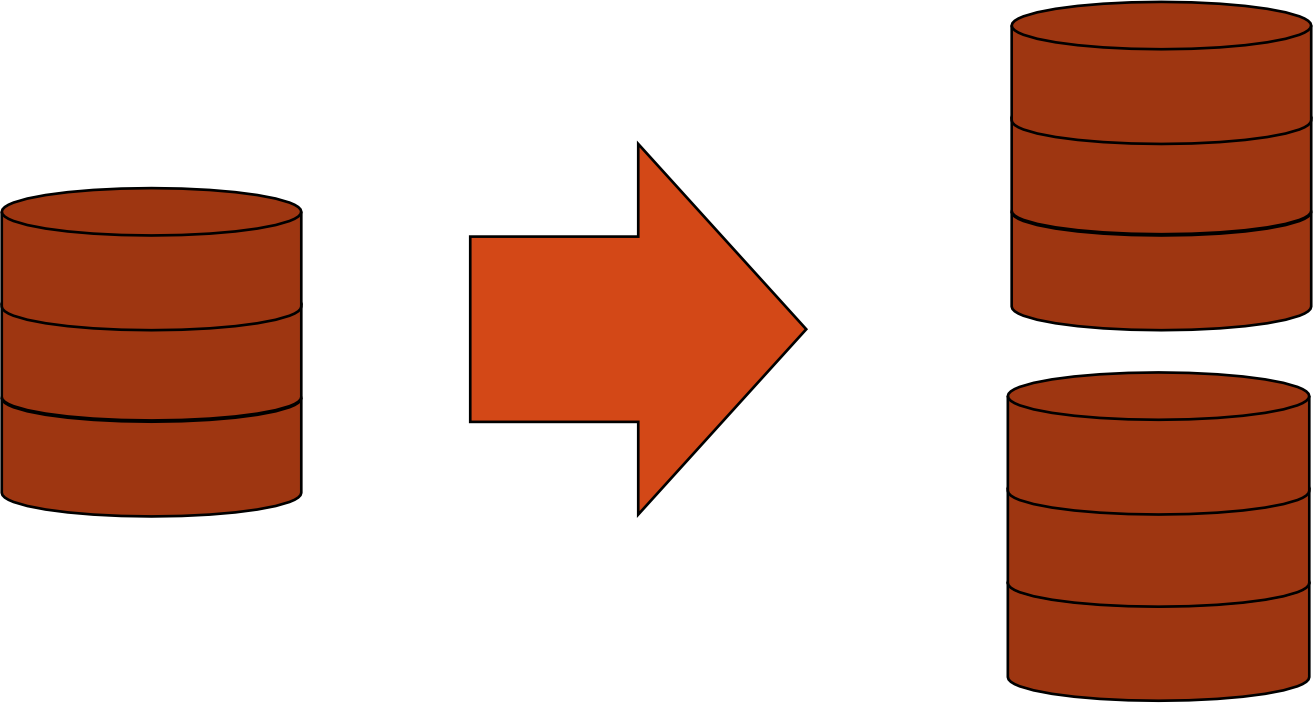
Replication
- Copies the entire database across all nodes in the distributed system
- Optimized for fast reads and high data reliability
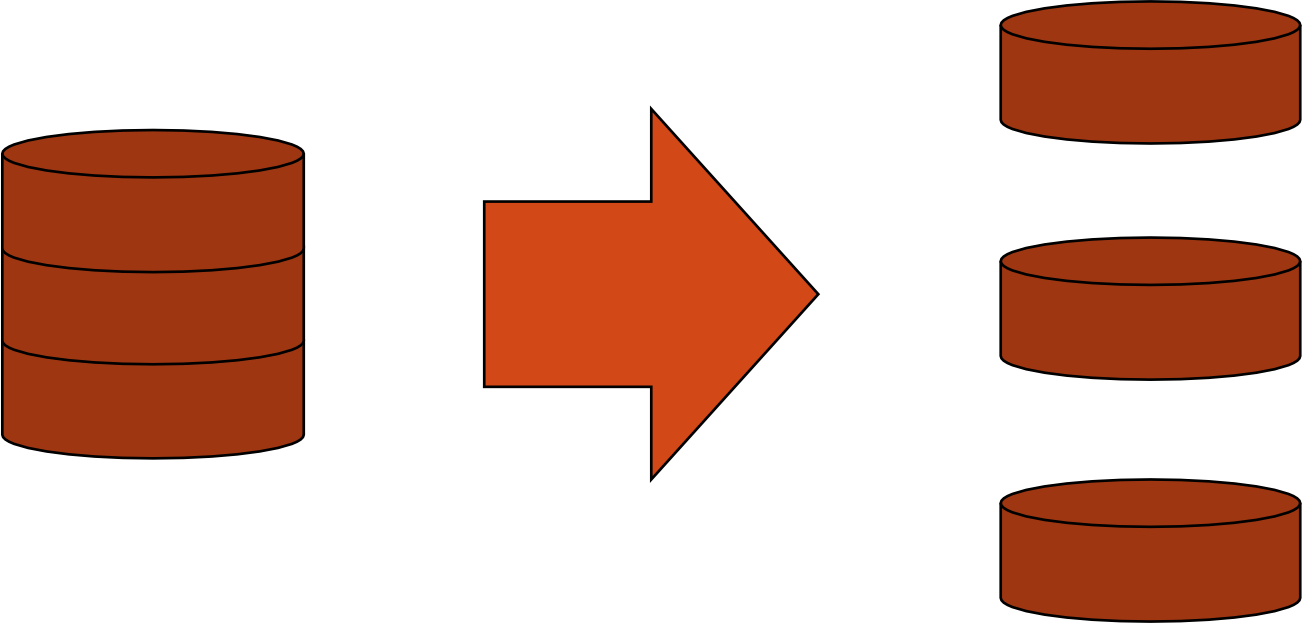
Sharding (in distributed context)
- Divides data inside the database and partitions pieces to different nodes
- Can be sharded horizontally (by rows) or vertically (by columns)
Pros/Cons Comparison
| Sharding | Replication | |
|---|---|---|
| Pros | Fast read/write; Low memory overhead | Fast reads; High data reliability |
| Cons | Potential data loss | High network overhead; High memory overhead |
NoSQL Distributed Databases
- Nearly all NoSQL systems natively support distributed database designs
- This native distributed support is a key part of what makes NoSQL so appealing

In Summary (NoSQL Overview)
- NoSQL is a movement away from relational databases
- NoSQL databases allow programmers to easily traverse and manipulate data
- Databases like OrientDB are freely available and open source
- Distributed databases take full advantage of clusters of less expensive hardware
The Perfect Storm
- Large datasets + acceptance of alternatives + dynamically-typed data = the NoSQL perfect storm
- This is not a backlash/rebellion against RDBMS
- SQL is a rich query language that current NoSQL offerings cannot rival
CAP Theorem
Three Properties of a Distributed System
- Consistency (C): Write a value, then read it — you get the same value back. In a partitioned system, there are windows where this is not guaranteed.
- Availability (A): The system may not always be able to read or write. A system may refuse writes to keep itself consistent.
- Partition Tolerance (P): Divide nodes into small groups — they can see some groups but not all (network partition).
Key Rule: You can have at most two of these three properties for any shared-data system.
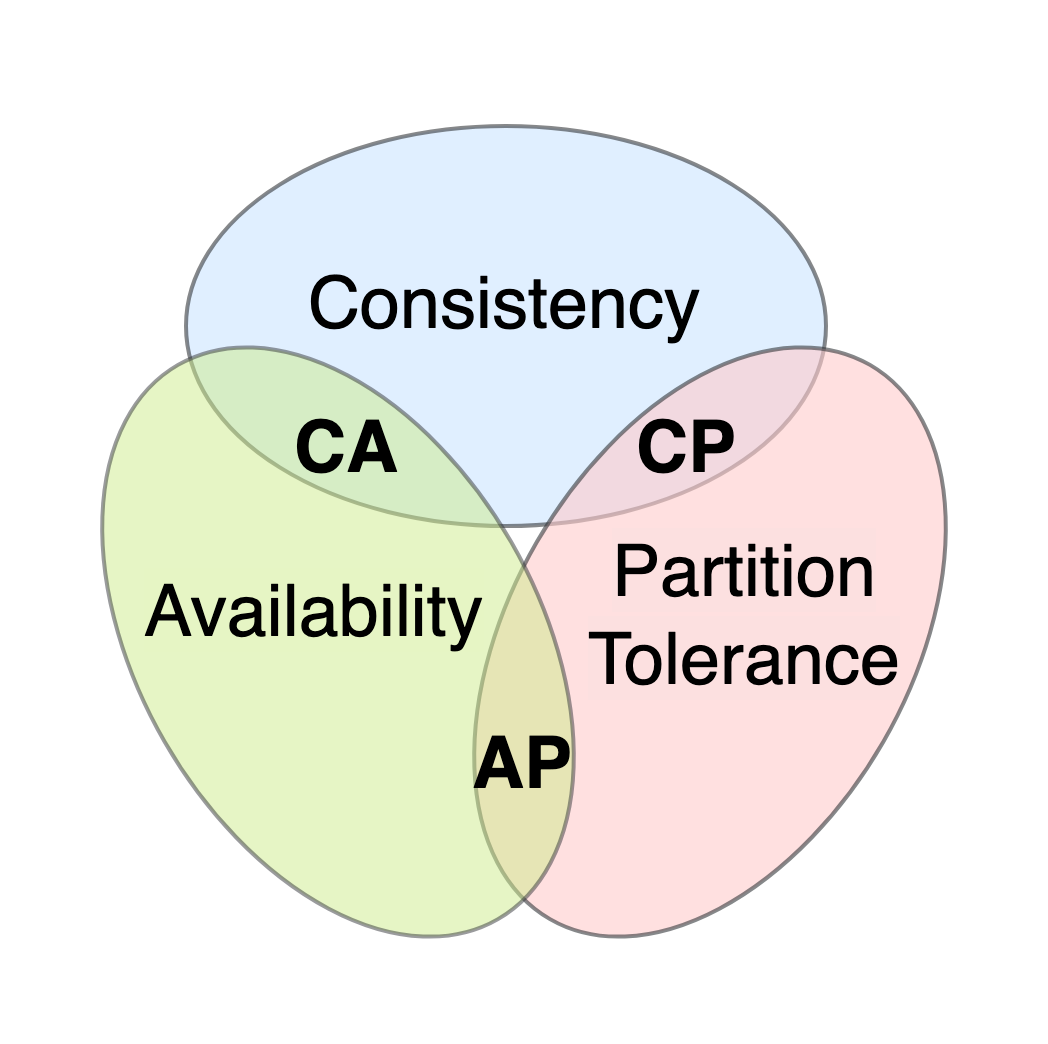
- To scale out, you must partition (P) → you must choose between C and A
- In most cases, you choose Availability over Consistency (but not always!)
Pair the often goes together!
PA
Like a group project: you can have work done consistently (everyone has the same version), available (everyone can always access it), or partition-tolerant (the project continues even if some members are unreachable) — but never all three perfectly at once.
CAP Theorem: Practical Examples
- Shopping cart (checkout): Choose high availability — always honor "add to cart" requests because it's revenue-producing. Errors are hidden from the customer and sorted out later.
- Order submission: Choose consistency — multiple services (credit card processing, shipping, reporting) simultaneously access the data, so consistency is critical.
CAP Diagram Summary
| Pick 2 | Gives Up |
|---|---|
| C + A | Partition Tolerance (P) |
| C + P | Availability (A) |
| A + P | Consistency (C) |
Consistency
Two Kinds of Consistency
| Strong Consistency | Weak Consistency | |
|---|---|---|
| Model | ACID | BASE |
| Full name | Atomicity, Consistency, Isolation, Durability | Basically Available, Soft-state, Eventual consistency |
ACID Transactions
A DBMS supports ACID transactions, processes that are:
- Atomic: Either the whole process is done, or none of it is
- Consistent: Database constraints are preserved
- Isolated: It appears to the user as if only one process executes at a time
- Durable: Effects of a process are not lost if the system crashes
Atomicity
- A real-world event either happens or does not happen
- A student either registers for a course, or does not register
- The system must ensure the transaction runs to completion, or has no effect at all
- Not true of ordinary programs — a crash could leave files partially updated
Commit and Abort
- If a transaction successfully completes → it commits
- System ensures all changes are saved
- If a transaction does not complete → it aborts
- System rolls back (undoes) all changes made by that transaction
Database Consistency
- Enterprise/Business Rules limit allowable real-world events
- e.g., A student cannot register if current registrants = maximum allowed
- Allowable database states are restricted:
- These limitations are called static integrity constraints — assertions that must be satisfied by all database states (state invariants)
State Invariants
- Database might store the same information in different ways (but same meaning)
- e.g.,
- Database is consistent if all static integrity constraints are satisfied
Transaction Consistency
- A consistent database state does not necessarily model the actual state of the enterprise
- A deposit that increments balance by the wrong amount still satisfies but doesn't maintain the correct enterprise state
- A consistent transaction both:
- Maintains database consistency
- Maintains correspondence between database state and enterprise state
- Specification of deposit transaction:
(where is the next value of balance)
Techniques for Transaction Consistency
- Two-Phase Locking (Shrinking phase + Lock phase)
- Timestamp Ordering
Isolation
- Serial Execution: transactions execute in sequence — one starts only after the previous one completes
- Each transaction's execution is isolated from all others
- If the initial state and all transactions are consistent → final state will be correct (100%)
- Problem: Serial execution is inadequate from a performance perspective
Concurrent Execution (Better Performance)
- A computer has multiple resources capable of executing independently (CPUs, I/O devices)
- A transaction typically uses only one resource at a time
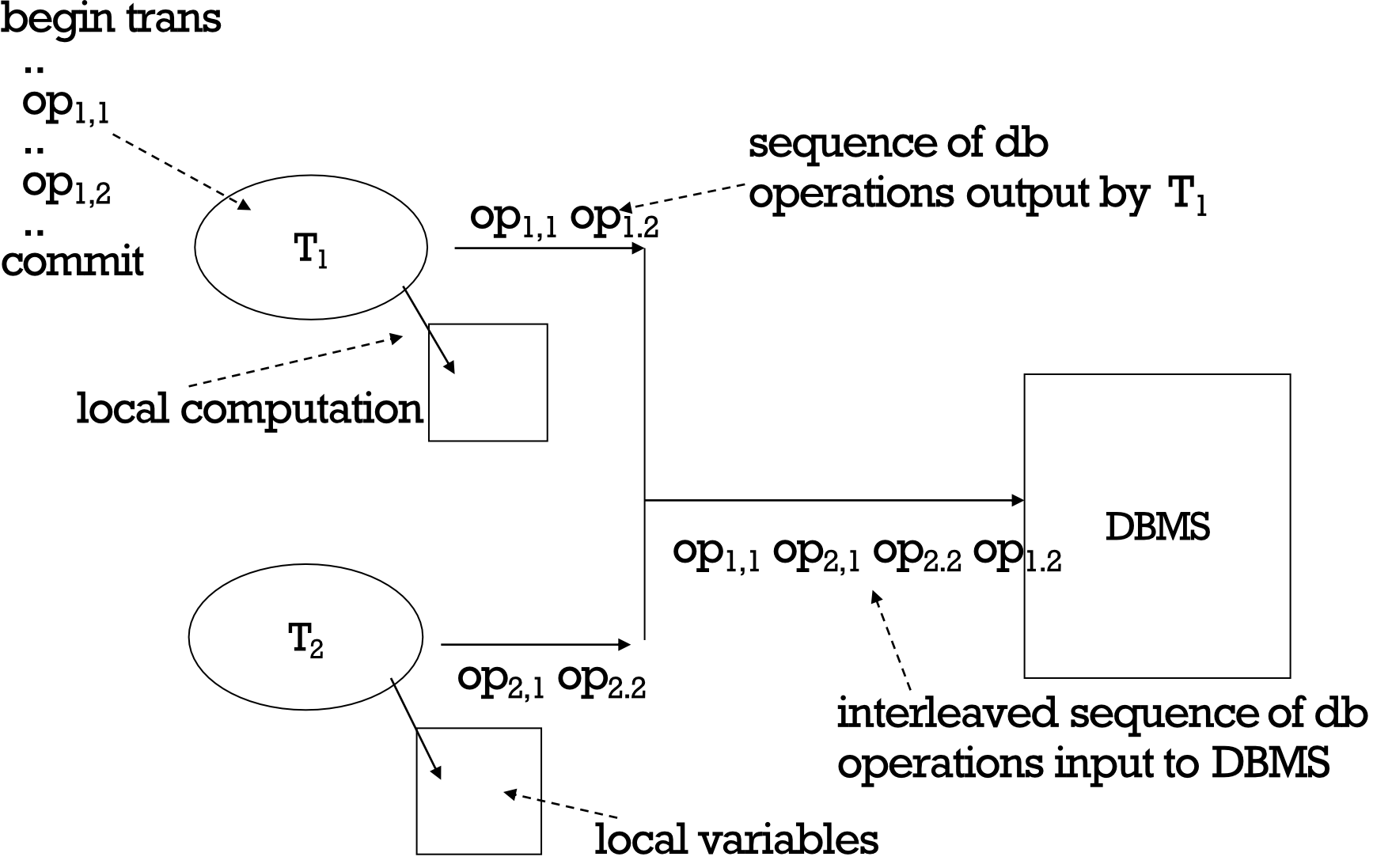
- Concurrently executing transactions yield interleaved schedules
T1:  op1,1  op1,2  ...  commit
T2:  op2,1  op2,2  ...

DBMS sees: op1,1 → op2,1 → op2,2 → op1,2 → ...  (interleaved)
Durability
- The system must ensure that once a transaction commits, its effect is not lost despite subsequent failures
- Not true of ordinary programs — a media failure after termination could restore the file system to a prior state
- Managed by the recovery manager (checkpoint technique + data restoration)
Implementing Durability
- Database stored redundantly on mass storage devices to protect against media failure
- Storage device architecture affects tolerance for different failure types
- Related to Availability:
- Non-stop DBMS: mirrored disks
- Recovery-based DBMS: log files, data backup, checkpoints
Consistency Model
- A consistency model determines rules for visibility and apparent order of updates
- Example scenario:
- Row X is replicated on nodes M and N
- Client A writes row X to node N
- Some time elapses
- Client B reads row X from node M
- Does client B see Client A's write?
- Consistency is a continuum with tradeoffs — usually traded off against Availability
- For NoSQL: the answer is "maybe"
- CAP Theorem: Strict consistency cannot be achieved simultaneously with availability and partition-tolerance
Eventual Consistency
- When no updates occur for a long period, eventually all updates will propagate through the system and all nodes will be consistent
- For a given accepted update and a given node: eventually either the update reaches the node or the node is removed from service
- Known as BASE (as opposed to ACID)
Like a Wikipedia edit — after you save a change, it may take time for it to appear across all server regions. Eventually, everyone sees the same version.
BASE
- Basically Available: The system seems to work all the time
- Soft State: Doesn't have to be consistent all the time
- Eventually Consistent: Becomes consistent at some later point in time
Availability
- Traditionally: availability = server/process available five 9's ()
- For large node systems: at almost any point in time, there's a good chance a node is down or there's a network disruption
- Goal: build a system that is resilient in the face of network disruption
CAP Theorem Summary
- C + A: Works only when no partitions — not realistic for large-scale distributed systems
- C + P: HBase, BigTable — strongly consistent but may sacrifice availability
- A + P: Cassandra, DynamoDB — highly available but eventually consistent
What Kinds of NoSQL?
Key/Value ("The Big Hash Table")
- Amazon S3 (Dynamo)
- Voldemort
- Scalaris
- Memcached — in-memory key/value store
- Redis
Schema-less (Column/Document/Graph)
- Cassandra — column-based
- CouchDB — document-based
- MongoDB — document-based
- Neo4J — graph-based
- HBase — column-based
Key/Value: Pros and Cons
Pros
- Very fast
- Very scalable
- Simple model
- Able to distribute horizontally
Cons
- Many data structures (objects) can't be easily modeled as key-value pairs
Schema-less: Pros and Cons
Pros
- Richer data model than key/value
- Eventual consistency
- Many are distributed
- Excellent performance and scalability
Cons
- Typically no ACID transactions or JOINs
Common Advantages of NoSQL
- Cheap and easy to implement (open source)
- Data replicated to multiple nodes — identical and fault-tolerant
- Data can be partitioned
- Down nodes easily replaced
- No single point of failure
- Easy to distribute
- No schema required
- Can scale up and down
- Relaxed data consistency requirement (CAP tradeoff)
What Are You Giving Up? (NoSQL Trade-offs)
JOINoperationsGROUP BYORDER BY- ACID transactions
- SQL — a powerful, expressive query language
- Easy integration with other SQL-supporting applications
BigTable and HBase (C+P)
Category: Consistency + Partition Tolerance (C+P in CAP)
BigTable Data Model
- A table in BigTable is a sparse, distributed, persistent, multidimensional sorted map
- Map indexed by: row key, column key, and a timestamp
- Supports lookups, inserts, deletes
- Only single-row transactions
Table: webtable
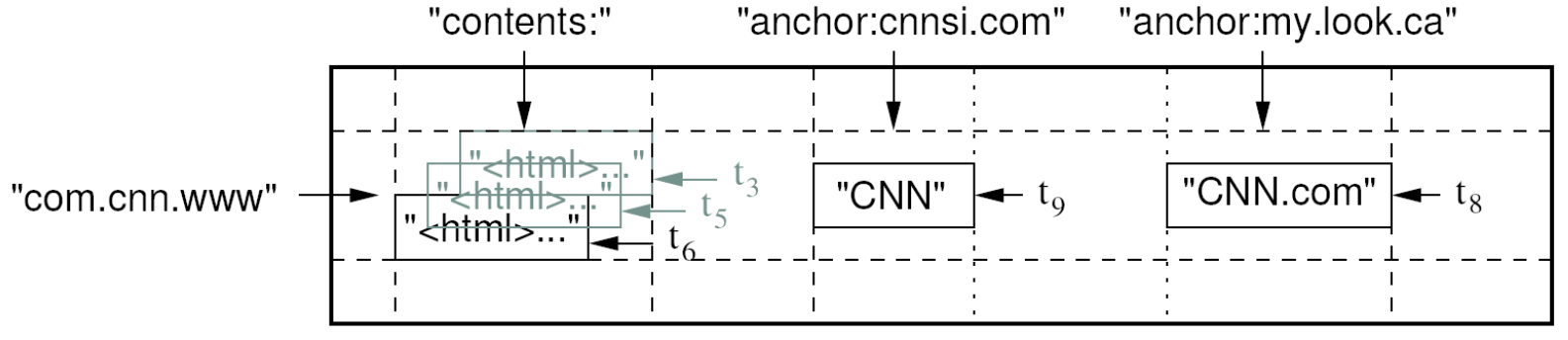
| Column Families | contents | anchor |
|---|---|---|
| Description | Page HTML content | All pages linking to this page |
- Row key = webpage URL
- Column = all pages linking to it
Think of it like an enormous, multi-layered spreadsheet where rows are web pages, and columns store different attributes — all indexed by time so you can see historical versions.
What Is Anchor (Anchor Text)?
In HTML, an anchor is a hyperlink created using the <a> tag.
Example 1:
<a href="http://www.cnn.com">CNN</a>| Part | Meaning |
|---|---|
| URL | http://www.cnn.com |
| Anchor text | CNN |
| Example 2: |
<a href="http://www.cnn.com">CNN</a>
<a href="http://www.cnn.com">CNN.com</a>| Source Website | Anchor Text |
|---|---|
| cnnsi.com | CNN |
| my.look.ca | CNN.com |
Internal Storage Representation
BigTable/HBase actually stores data as:
Why BigTable's Model Is Powerful
- Designed at Google for web indexing
- Row key = webpage; Column = all pages linking to it
- A webpage might have millions of incoming links — impossible in a relational table
- This is why Big Data systems like the Hadoop ecosystem rely on it
RDBMS vs. Column Family Model
| Relational DB | Column Family Model | |
|---|---|---|
| Schema | Rigid, pre-defined, fixed | Flexible |
| Structure | Tables with fixed columns | Column families with dynamic columns |
Rows and Columns in BigTable
- Rows maintained in sorted lexicographic order (alphabetical)
- Applications can exploit this for efficient row scans
- Row ranges dynamically partitioned into tablets
- Columns grouped into column families
- Column key =
family:qualifier - Column families provide locality hints
- Unbounded number of columns allowed
- Column key =
BigTable Building Blocks
- GFS — Google File System (distributed storage)
- Chubby — distributed coordination service
- SSTable — Sorted Strings Table (data storage format)
Chubby
- A distributed coordination service
- Goal: Allow client applications to synchronize and manage dynamic configuration state
- Intuition: Only some parts of an app need consensus → Highly available view service
- Master election in a distributed file system (e.g., GFS)
- Metadata for sharded services
Chubby's Role in BigTable
- Ensures there is only one active master
- Stores the bootstrap location of BigTable data
- Used to discover tablet servers
- Stores BigTable schema information
- Stores access control lists
Chubby is like a traffic controller — it makes sure only one car (master) is controlling an intersection at a time, and everyone knows where to look for directions.
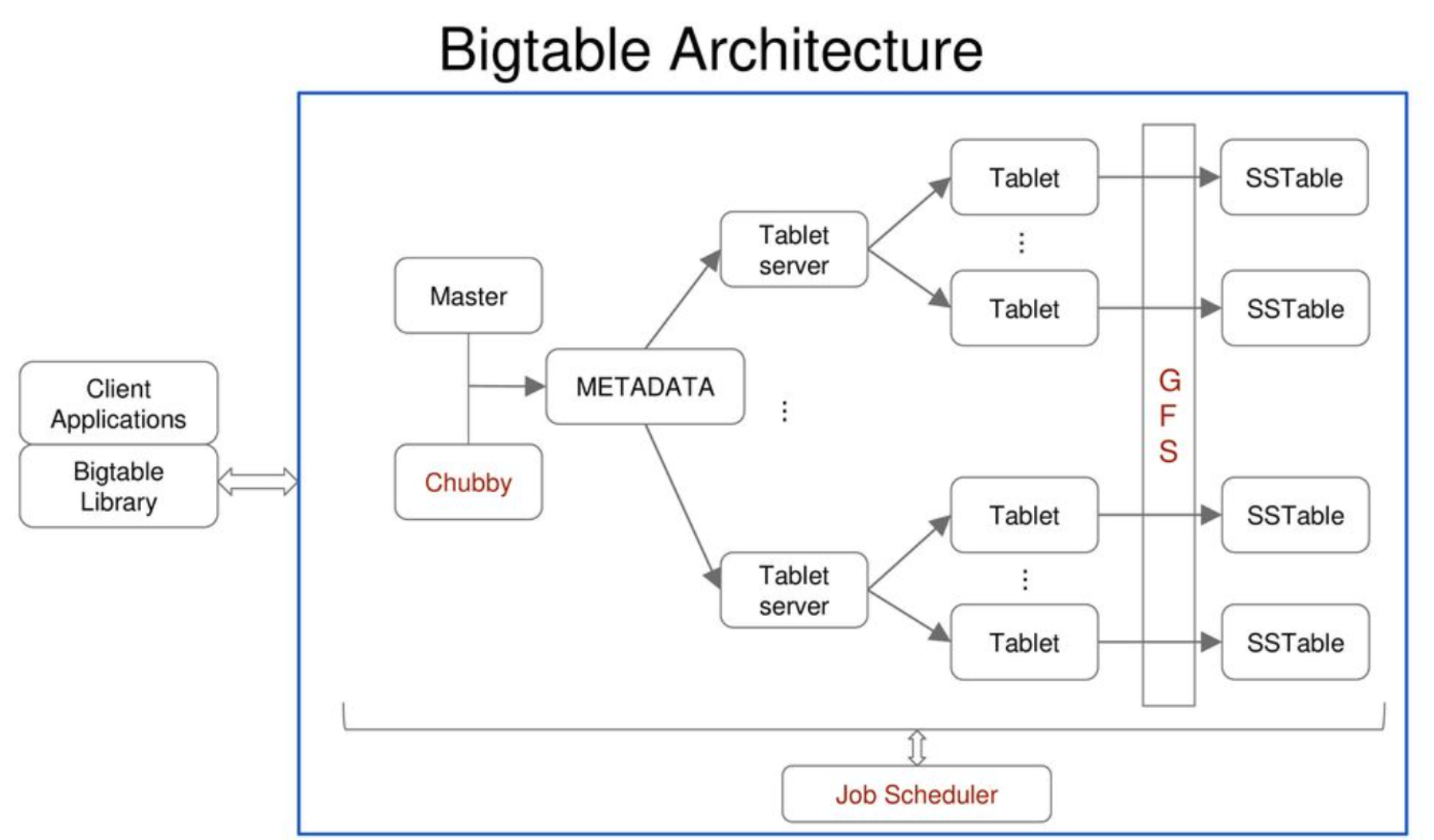
Bigtable Architecture
SSTable (Sorted Strings Table)
- A file of key/value string pairs, sorted by keys
- Basic building block of BigTable
- Persistent, ordered, immutable map from keys to values
- Stored in GFS
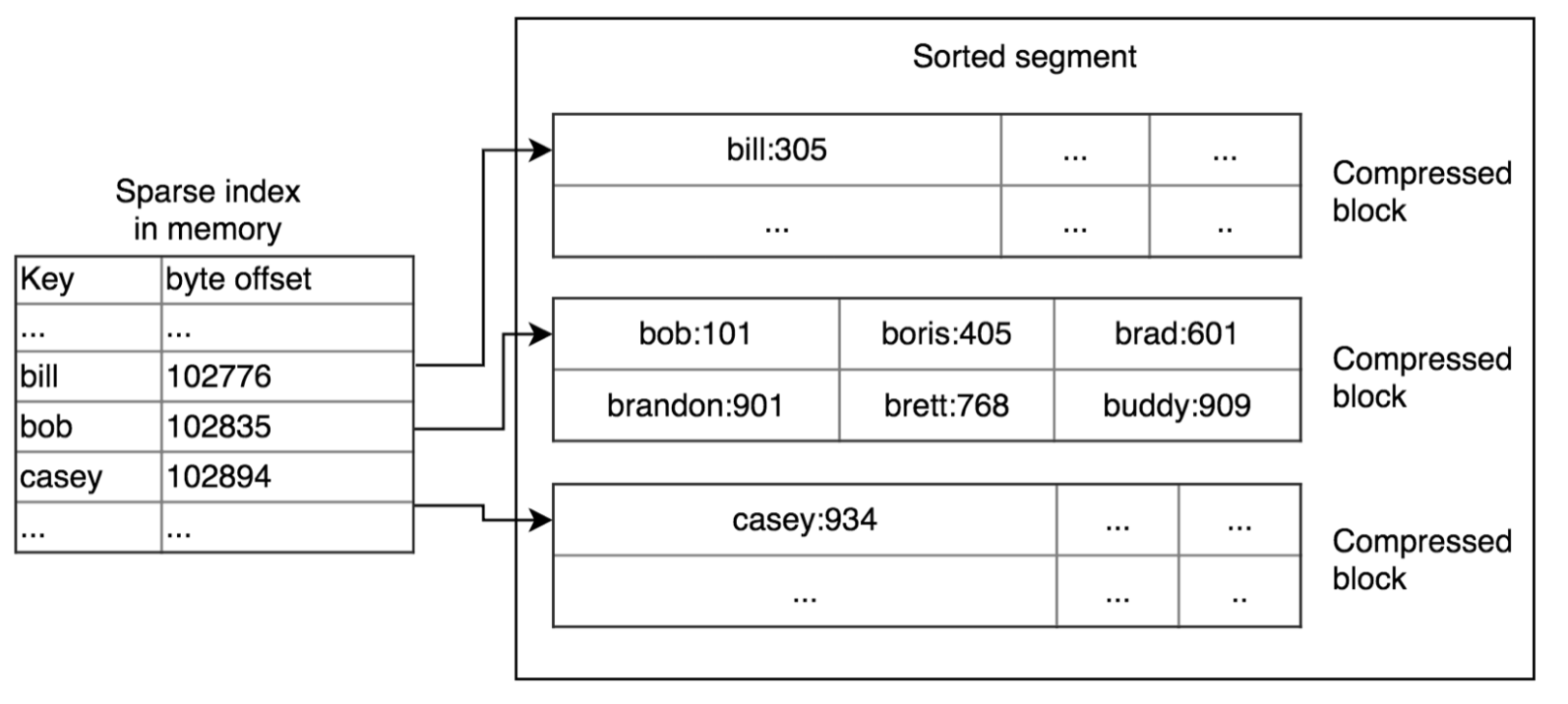
- Sequence of blocks on disk plus an index for block lookup
- Can be completely mapped into memory
Supported Operations
- Look up value associated with key
- Iterate key/value pairs within a key range
Storage Structure
[ 64K block | 64K block | 64K block | ... | Index ]
SSTable Details
- File format to store BigTable data durably
- Stored as a series of 64KB blocks, with a block index at the end
- Index is loaded into memory when SSTable is opened
- Lookup in a single seek: find block in memory index → seek to block on disk
SSTable Diagram
When to Use an SSTable?
Two common usages:
- As input and/or output of a MapReduce job (e.g., part of a processing pipeline)
- As a lookup table for an application server that needs many random access lookups
Advantages and Disadvantages of SSTable
| Advantages | Disadvantages |
|---|---|
<Key, Value> storage format | Immutable (write-once) |
| Duplicate keys allowed | Sorting of keys must be done before creating a table |
| Quick lookups based on keys | Only supports lookup based on keys |
| Sharding and compression handled automatically | |
| Easy to use with MapReduce |
Tablet
- A dynamically partitioned range of rows
- Built from multiple SSTables
- The unit of distribution and load balancing

A tablet is like one drawer in a filing cabinet. The entire cabinet is the table; each drawer (tablet) holds a sorted range of files (SSTables).
Table
- Multiple tablets make up the table
- SSTables can be shared between tablets

BigTable Component Hierarchy
- Consistency → Chubby
- Partition Tolerance → SSTables
Architecture
Three Components
- Client library
- Single master server
- Tablet servers
BigTable Master
- Assigns tablets to tablet servers
- Detects addition and expiration of tablet servers
- Balances tablet server load
- Handles garbage collection
- Handles schema changes
BigTable Tablet Servers
- Each tablet server manages a set of tablets
- Typically 10 to 1,000 tablets per server
- Each tablet: 100–200 MB by default
- Handles read and write requests to the tablets
- Splits tablets that have grown too large
Tablet Location
Three-level hierarchy for tablet location — Chubby → Root Tablet (METADATA table) → METADATA Tablets → User Tablets
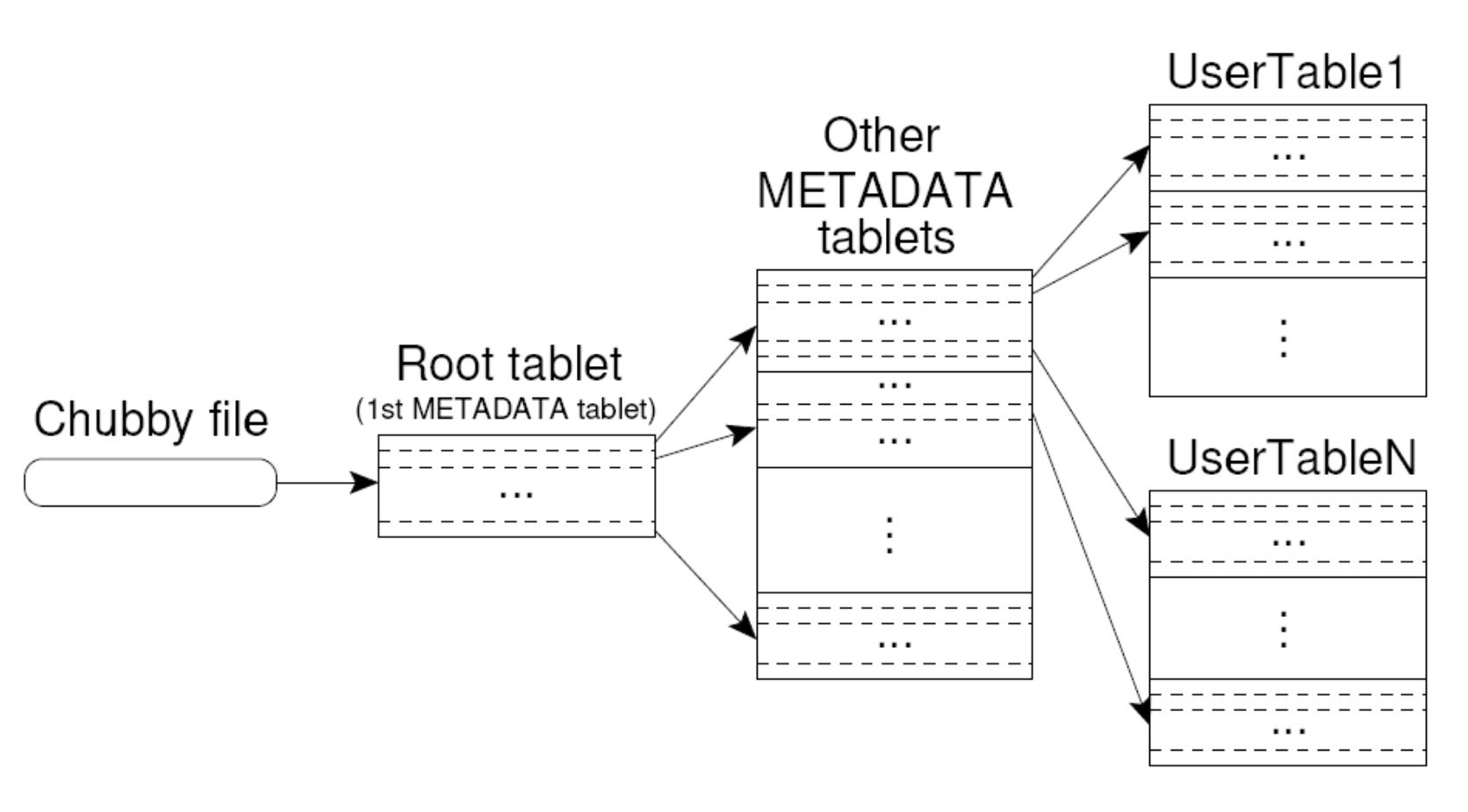
- Upon discovery, clients cache tablet locations
Tablet Assignment
Master Keeps Track Of:
- Set of live tablet servers
- Assignment of tablets to tablet servers
- Unassigned tablets
Rules
- Each tablet assigned to one tablet server at a time
- Tablet server maintains an exclusive lock on a file in Chubby
- Master monitors tablet servers and handles assignment
Changes to Tablet Structure
- Table creation/deletion — master initiated
- Tablet merging — master initiated
- Tablet splitting — tablet server initiated
Tablet cannot by shared by a tablet server while SSTable can be shared by multiple tablets: TRUE
Tablet Server Internals
Image: Tablet server internals — Write Op → WAL (commit log) + memtable (memory) → GFS SSTable files; Read Op → merged view of SSTables + memtable
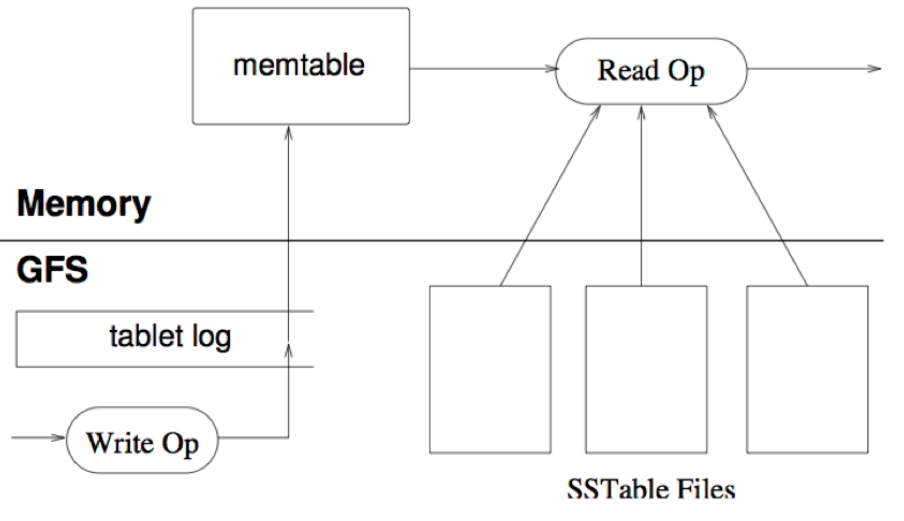
How a Tablet Server Works
- Manages 10–1,000 tablets
- Handles read/write requests for assigned tablets
- Splits tablets when they get too big
- Durable state stored in GFS
- GFS provides atomic append and fast sequential reads/writes
Writes
Usually asked in the #FinalExam
- Updates committed to a commit log (WAL — Write Ahead Log) storing REDO records
- Recently committed writes cached in memory in a memtable
- Older writes stored in a series of SSTables in GFS
Reads
- Executed on a merged view of SSTables + memtable
- Both are lexicographically stored → merge is efficient
Redo Log Files (WAL)
- WAL = Write Ahead Log (redo log files)
- Concept: We do NOT need to flush data pages to disk on every transaction commit
- Data is written into log files (redo log files) first, then flushed/written to disk later
What Happens on a Crash?
- Any changes not yet applied to data pages/disk → redone from log records (redo log files) → roll-forward recovery
- Changes made by uncommitted transactions → removed from data pages → roll-backward recovery (UNDO → Checkpoints)
REDO is preferred for data recovery !!!!! ไปเปรียบเทียบมาต่างกับ UNDO อย่างไรนะ
Compactions
- Minor Compaction
- Converts the memtable into an SSTable
- Reduces memory usage and log traffic on restart
- Merging Compaction
- Reads contents of a few SSTables + memtable → writes out a new SSTable
- Reduces the number of SSTables
- Major Compaction
- Merging compaction that results in only one SSTable
- No deletion records — only live data remains
Compaction is like cleaning up your desk: minor compaction tidies one pile, merging compaction consolidates several piles, major compaction leaves you with just one clean pile.
Performance Benchmark
Image: Performance graph — 1000-byte read/write benchmark across number of tablet servers, showing scan, random read/write, sequential read/write performance
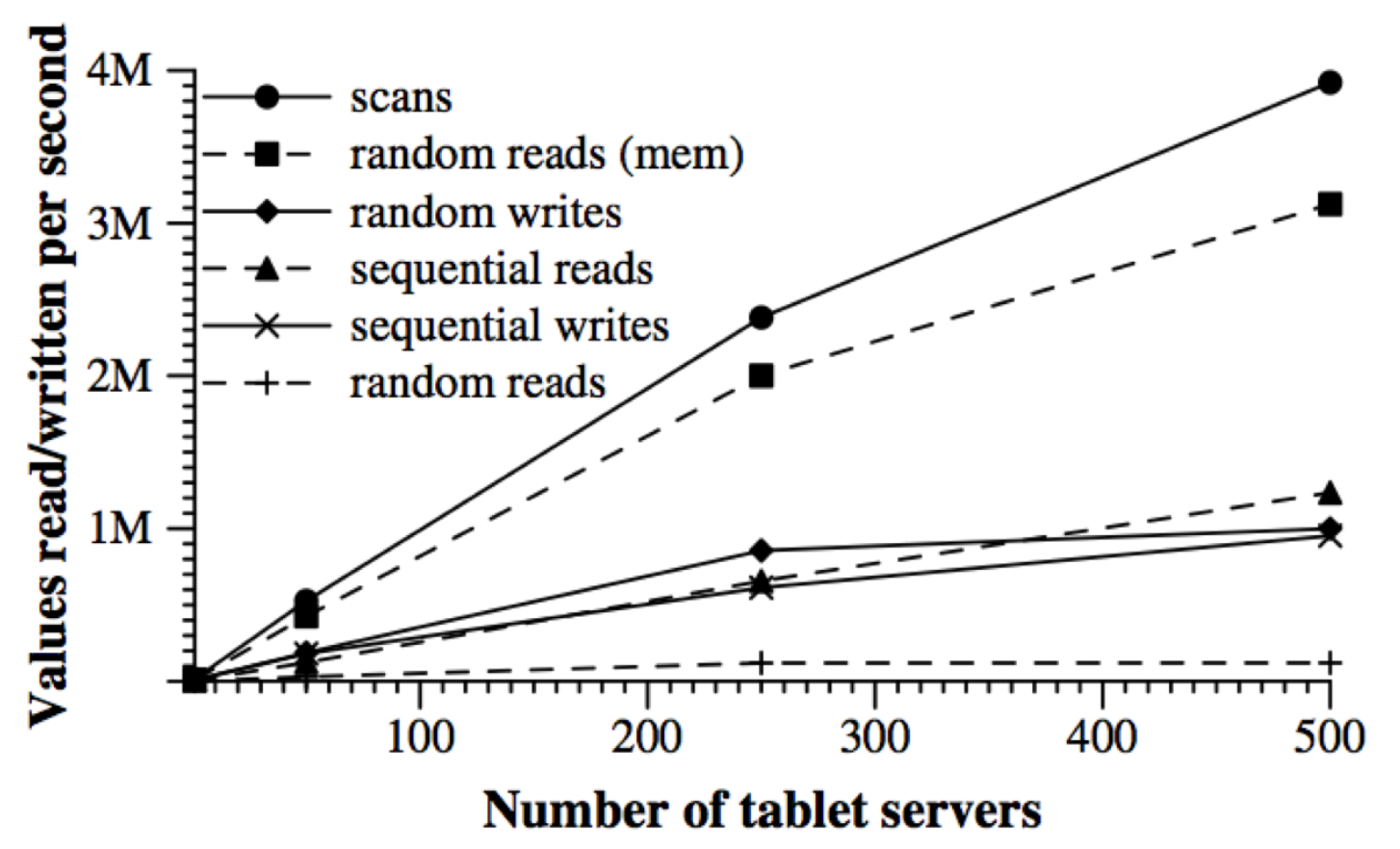
Key Observations
- Scans: batch multiple reads into a single RPC → most efficient sequential access (ให้ high throughput ไง)
- Random reads (disk): worst performance — each request involves a 64KB SSTable block read from GFS to tablet server
- Random reads (mem): much faster as data is served from memtable
- Random writes ≈ sequential writes: both result in appends to a log
BigTable Applications
- Data source and data sink for MapReduce jobs
- Google's Web Crawl
- Google Earth
- Google Analytics
Lessons Learned (from BigTable)
- Fault tolerance is hard
- Don't add functionality before understanding its use
- Single-row transactions appear to be sufficient
- Keep it simple!
HBase: Introduction
HBase is an open-source, distributed, column-oriented database built on top of HDFS — based on BigTable!
HBase Is...
- A distributed data store that can scale horizontally to 1,000s of commodity servers and petabytes of indexed storage
- Designed to operate on top of Hadoop Distributed File System (HDFS) or Kosmos File System (KFS / Cloudstore)
- Provides: scalability, fault tolerance, and high availability
HBase Benefits
- Distributed storage
- Table-like data structure (multi-dimensional map)
- High scalability
- High availability
- High performance
HBase Backdrop (Timeline)
| Date | Event |
|---|---|
| 2006.11 | Google releases paper on BigTable |
| 2007.2 | Initial HBase prototype created as Hadoop contrib |
| 2007.10 | First useable HBase |
| 2008.1 | Hadoop becomes Apache top-level project; HBase becomes subproject |
| 2008.10~ | HBase 0.18, 0.19 released |
Started by Chad Walters and Jim Kellerman
Why BigTable?
- RDBMS performance is good for transaction processing but for very large-scale analytic processing, solutions are commercial, expensive, and specialized
- Very large-scale analytic processing requires:
- Big queries — typically range or table scans
- Big databases (100s of TB)
- MapReduce on BigTable (with optionally Cascading on top for relational algebras) may be a cost-effective solution
- Sharding is NOT a solution for scaling open-source RDBMS platforms:
- Application-specific
- Labor-intensive (re)partitioning
Why HBase?
- HBase is a BigTable clone
- It is open source
- Has a good community and promise for the future
- Developed on top of and has good integration with Hadoop — if you're already using Hadoop, HBase is a natural fit
- Has a Cascading connector
Why HBase (Consistency)?
- HBase is strongly consistent
- Each row is hosted by a single region server at a time
- Uses row locks + multiversion concurrency control (MVCC) to provide consistency within a row
- During failover: new regionserver does not accept writes until the previous one is blocked out
- Replication handled at the HDFS layer — no edit acknowledged to client until flushed to 3 HDFS replicas
HBase Benefits Over RDBMS
| Feature | HBase |
|---|---|
| Indexes | No real indexes (row key only) |
| Partitioning | Automatic partitioning |
| Scaling | Linearly and automatically with new nodes |
| Hardware | Commodity hardware |
| Reliability | Fault tolerant |
| Processing | Batch processing support |
HBase Data Model
- Tables are sorted by Row
- Table schema only defines column families
- Each family consists of any number of columns
- Each column consists of any number of versions
- Columns only exist when inserted — NULLs are free (sparse)
- Columns within a family are sorted and stored together
- Everything except table names are
byte[]
Row key → [Column Family : [Column : [Timestamp → Value]]]
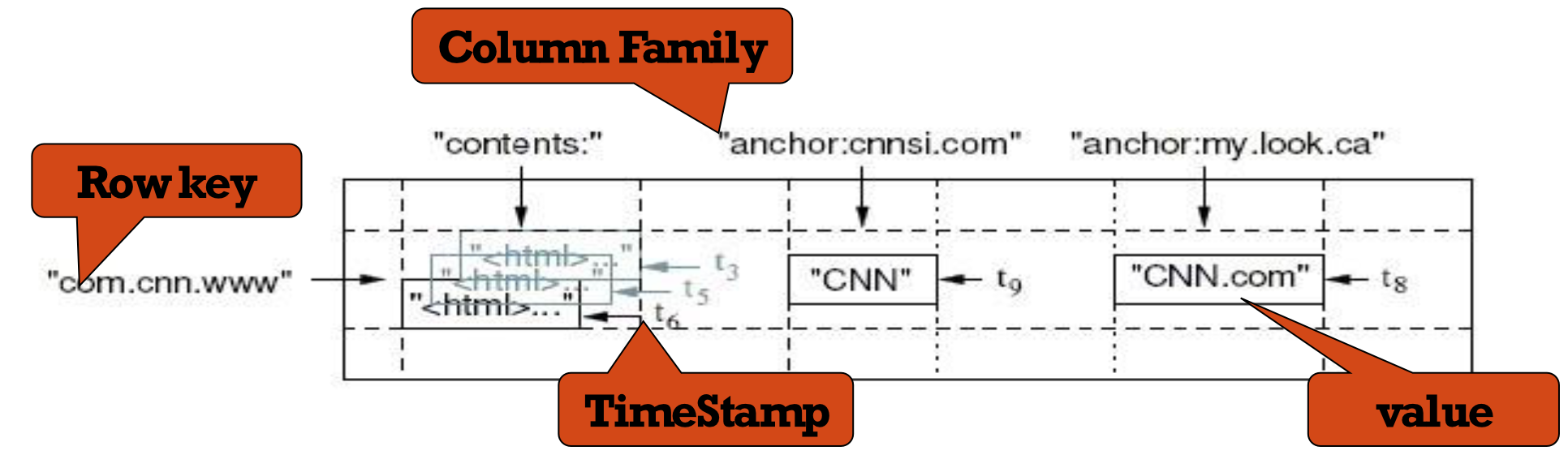
It's like a filing system where folders (column families) can contain any number of files (columns), and each file can have multiple dated versions.
HBase Members
Master
- Responsible for monitoring region servers
- Load balancing for regions
- Redirects clients to the correct region servers
RegionServer (Slaves)
- Serves requests (Write/Read/Scan) of clients
- Sends HeartBeat to Master
- Throughput and Region numbers are scalable by adding region servers
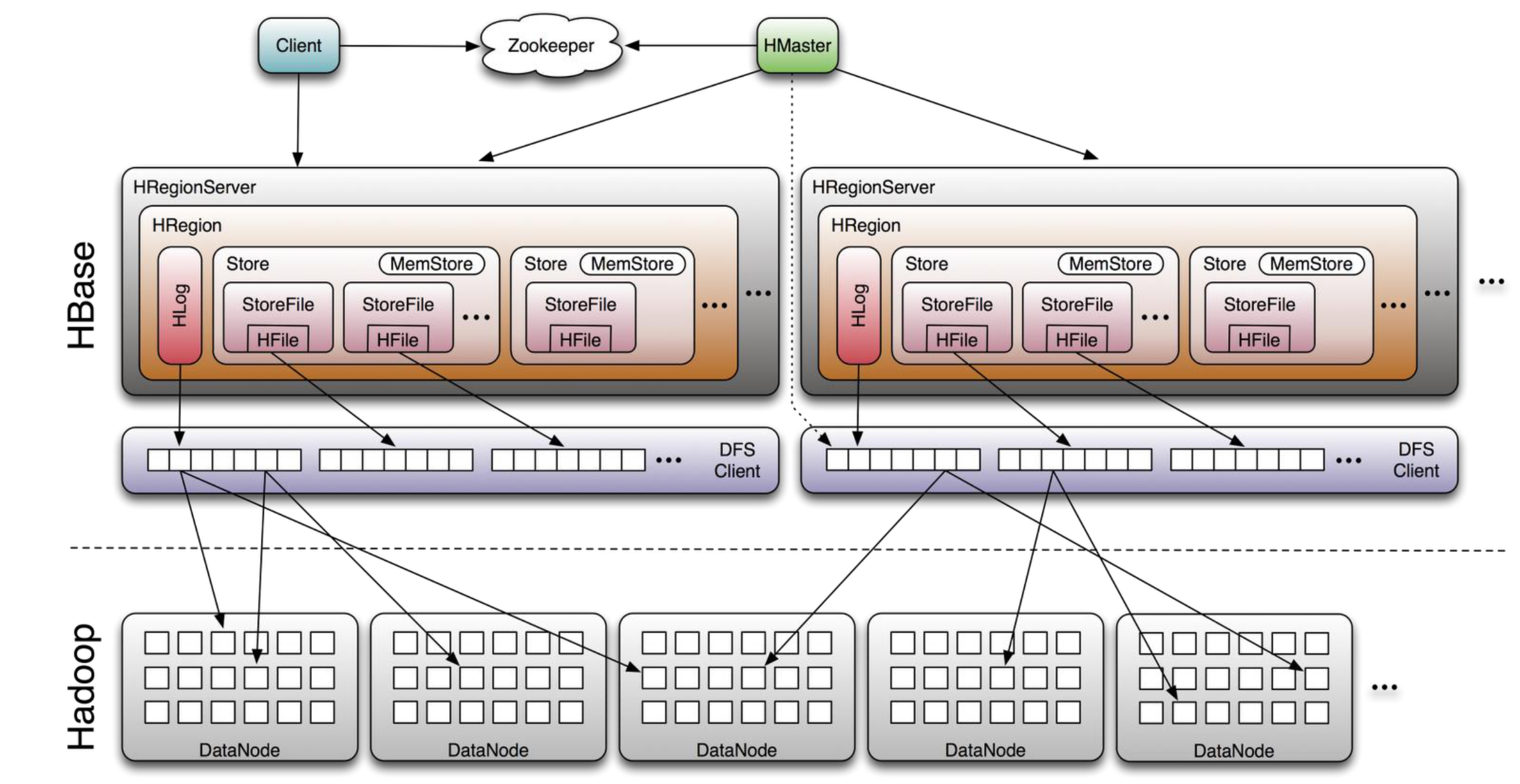
HBase Architecture
Image: HBase Architecture — HRegionServer components, HDFS integration, ZooKeeper coordination
Connecting to HBase
Java Client
get(byte[] row, byte[] column, long timestamp, int versions);Non-Java Clients
- Thrift server hosting HBase client instance
- Sample clients: Ruby, C++, Java (via Thrift)
- REST server hosts HBase client
MapReduce Integration
TableInput/OutputFormatfor MapReduce- HBase as MapReduce source or sink
HBase Shell
- JRuby IRB with a "DSL" to add
get,scan, and admin commands
./bin/hbase shell YOUR_SCRIPT